Pilot Rank


Rank

Walker Air Transport utilizes the smartCARS 3 (Windows/MacOS/Linux) or FlightTrackerXP (Mac) ACARS systems and the company’s proprietary, fully-automated Flight Data System (FDS) to log data produced and transmitted to us by your Simulator.

Once you’ve completed your flight and submitted the PIREP, our FDS goes to work reviewing it and making a decision on its acceptability. And it’s all done very quickly. Within seconds, you’ll have all of your flight’s data to review, including, though not limited to, these major items:

1 2 3 4 5 6 Aircraft Type Flown Flight Time Flight Distance Landing Rate Points Awarded Flight Status (Approved; Rejected; Diverted)

We're pleased and excited to have this system in place because we think it:

    adds more value to the total experience; and, by analyzing their performance and applying what they learn from it, our Pilots are challenged to continually improve their flying skills and proficiency.

    In order to be promoted to the next rank, you must meet both of the requirements noted below for minimum hours and minimum points.

    Hours and points do not reset on promotion. They carry over as you progress towards your next rank.

    Rank | Title Insignia Minimum Hours Minimum Points Pay Rate (Hourly) Flight Student

    image-1638456445376.png

    0 0 $15.00 First Officer

    image-1638456466547.png

    25 300 $35.00 Senior First Officer

    image-1638456479788.png

    75 900 $45.00 Captain

    image-1638456491667.png

    100 1,200 $65.00 Flight Captain

    image-1638456503699.png

    300 3,600 $85.00 Senior Flight Captain

    image-1638456514845.png

    500 6,000 $105.00 Chief Pilot I

    image-1638456526639.png

    1,000 12,000 $115.00 Chief Pilot II

    image-1638456540325.png

    2,500 30,000 $135.00 Chief Pilot III

    image-1638456554321.png

    5,000 60,000 $165.00 Senior Chief Pilot I

    image-1638456572277.png

    7,500 90,000 $192.00 Senior Chief Pilot II

    image-1638456585921.png

    10,000 120,000 $225.00 Senior Chief Pilot III

    image-1638456600978.png

    15,000 180,000 $255.00 Walker Emeritus

    image-1717025183873.png

    50,000 300,000 $300.00
     

    Points

    Points are awarded for each completed flight receiving an ‘Approved’ designation.

    The number of points you earn will depend on several factors – as you can see from the categories and points awards in the chart below.

    Approved Rejected Diverted

    The criteria for an Approved flight are:

      You completed a flight from your planned departure airport to your planned arrival airport; and,

      The Company’s Landing Rate Standard – a landing rate equal to or softer than -800 fpm was achieved

      All points, flight hours and pay are awarded.


      The PIREP is posted to your Logbook as being Completed | Approved.

      The criteria for a Rejected flight are:

        The Company’s Landing Rate Standard – a landing rate equal to or softer than -801 fpm was exceeded; and/or,

        The total points awarded for your flight equals -15 or more.

        Your flight time was 00:00 hours (premature landing); and/or,

        You used more fuel than you left the airport with (in-flight refueling); and/or,

        You did not fly with a Walker Air Transport livery.

        No points, flight hours or pay are awarded.


        The PIREP is posted to the your Logbook as being Completed | Rejected.

        The criteria for a Diverted flight are:

          You completed a flight from your planned departure airport to an unplanned arrival airport;

          The Company’s Landing Rate Standard – a landing rate equal to or softer than -800 fpm was achieved.

          All points, flight hours and pay are awarded.


          If this occurs when flying a Tour leg, you will not be advanced to the next leg. The leg will have to be reflown.


          The PIREP is posted to your Logbook as being Completed | Diverted.


          Points are calculated based on log entries from the ACARS client. If your client fails to record all the entries we require you may lose out on points. Flight Operations is unable to modify your log file.

          Microsoft Flight Simulator 2020 has a habit of not registering pilots in 'Cruise' phase due to how their altitude is determined. This will impact your log record, please click here to read our FAQ item on this in order to ensure you get proper points awarded.

          Category Points How is it determined? Completed Flight +5   Per Hour of Flight +1 Awarded for each hour of completed flight time. Per 50 Nautical Miles of Flight +1 Awarded for every 50 nautical miles flown. Completed 20-Minute Pre-Flight +3 Pre-flight time is calculatedCalculated between the log entries '"Now boarding'boarding" and '"Pushing back'back". Flaps Position Set Takeoff
          +1 Takeoff flaps are determined by logLog entry '"Flaps set to'to" thatdetected occurbefore before the log entry '"Taking off'off". Flaps Position Set Landing
          +1

          Landing flaps are determined by logLog entry '"Flaps set to'to" thatdetected occurafter "Approaching".

          afterWarmup Time the

          Requires logat entryleast 'Approaching'.3 Theminutes 'Approaching'between logengine entrystart willand nottake occur if you are not properly in cruise phase. Please read note above regarding MSFS 2020 and/or ensure you know how to properly use the ACARS application to set your correct cruise level.off.

          +1 Calculated using engine start and departure timestamps. Cooldown Time

          Requires at least 3 minutes between landing and engine shutdown.

          +1 Calculated using landing and engine shutdown timestamps. Exceed 250kts under 10,000 ft for more than 2 minutes

          Only applicable whento aircraft with MTOW is less than 300,000lbs (136,077kgs).

          -5 AircraftPenalty thatapplied haveif anaircraft MTOWexceeds less250kts below 10,000 ft for more than 300,000lbs2 (136,077kgs). You can view the MTOW of our fleet by visiting Company > Fleet in CrewOps and viewing the MTOW column.minutes.

          Overspeed 

          Only deducted once regardless of number of instancesoverspeed of overspeedingevents.

          -2 Log indicates 'Overspeed'"Overspeed".

          Time Compression

           Variable

          Points are awarded based on actual real flight time flown. 

          LogExample: indicatesAn 'Simulation8-hour rateflight setcompleted to'.in

          2

          real

          Ahours 15%using penaltytime compression will only receive 25% of the normal flight time points.

          Bonus Multiplier 1.75x / 1.5x  Aircraft cruising below 250kts receive a 1.75x multiplier.
          Aircraft cruising between 251kts and 400kts receive a 1.5x multiplier.
          Online ATC Bonus 1.5x  Flight must be assessedconnected againstto a supported online ATC network for at least 80% of the flight and use a valid WAT callsign. Event Bonus 2.0x  Pilot must be signed up for the event, fly the assigned event route/network, and remain connected online for at least 80% of the flight. Assignment Completion Bonus +1 per hour  Additional bonus points awarded for completed assignment flights. Tour Completion Bonus +5 per leg  Bonus points awarded upon completion of an entire tour. Total points awarded are calculated as 5 points multiplied by the total number of points earned for that flight.

          EXAMPLE:

          46 points earned – 7 point penalty (.15 × 46) = 39 points awarded.

          Bonus Multiplier

            The bonus multiplier helps equalize flightslegs in allthe Fleettour. aircraft regardless of distance flown and/or cruising speed by using a proprietary algorithm and applying it to those with cruise speeds of 250kts or less and cruise speeds between 251kts and 400kts.

          Pilots Home Airport

          Discovery &

          +5

          Milestone Bonuses

          You departedDiscovery frombonuses orare arrivedawarded atone time only when completing your Hubfirst airport.

          qualifying flight.

          The MTOW for the aircraft you are flying can be found at Company > Fleet.
          This is the value we use to determine the group below you will receive points from.

          LandingDiscovery RateType MTOW less than
          12,500lbsPoints
          MTOW more than
          12,500lbsRequirement
          -800 fpm to -701 fpm -8Airport -4 -700 fpm to -601 fpm -6 -2 -600 fpm to -501 fpm -4 +1 -500 fpm to -401 fpm -2 +2 -400 fpm to -300 fpmDiscovery +1 +4First completed flight into an airport. -300Country fpm to -201 fpmDiscovery +21 First completed flight into a country. Airline Discovery +51 First completed flight for an airline. -200Type fpm to -151 fpmRated +31 First completed flight using an aircraft type. Manufacturer Discovery +5 -150 fpm1 +100First +100completed flight using an aircraft manufacturer.
          -149 fpm to -101 fpm +4 +3 -100 fpm to 0 fpm +5 +2
          image-1692545978892.png If you happen to be lucky enough to land the illustrious -150fpm. You will be awarded with our super special "BUTTER!" badge and 100 points! Now, we must state for legal reasons that a -150fpm is not the holy grail landing you need to aim for in every single aircraft. Doing this can result in gear breakage, spoilers not activating, autobrakes sitting around, and well, the plane not working right. We warned you!

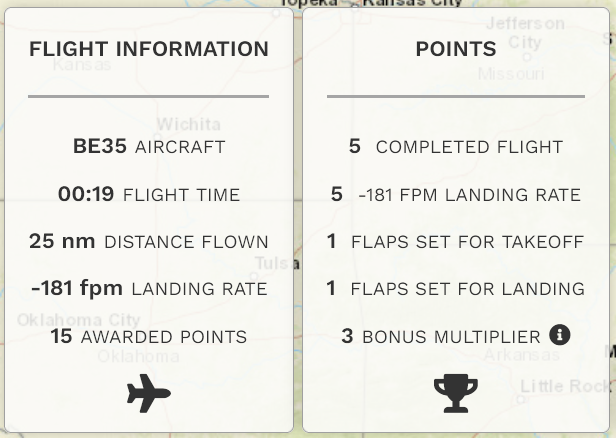
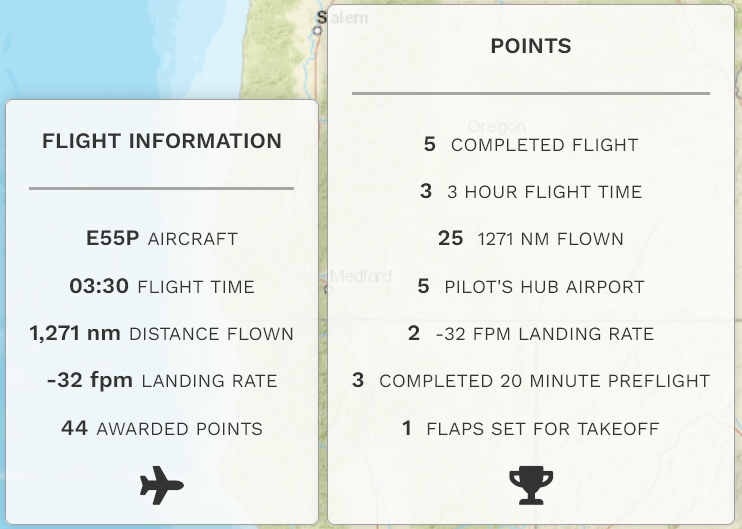
          Here are some examples illustrating how these category points factor into each completed flight.
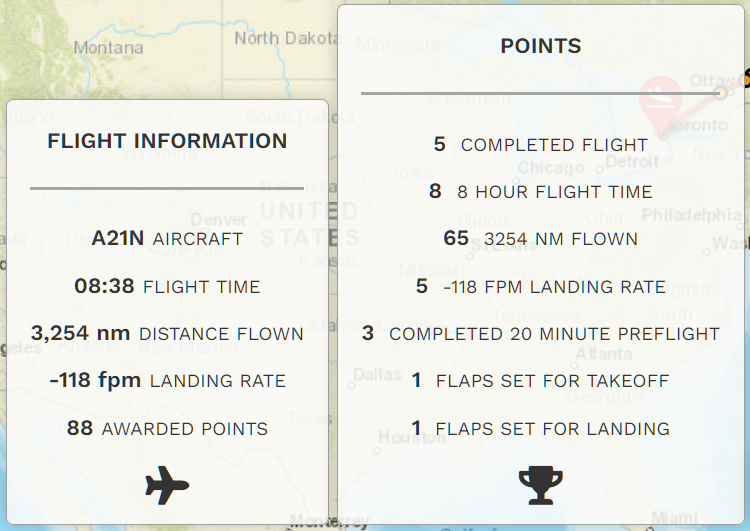
          1 2 3 image-1638202067020.png image-1638202135807.png image-1638202249779.png

          If you think your flight was graded incorrectly – or – you'd like to ask a question, submit a Help Ticket.