
Rank & Points
Rank
Walker Air Transport utilizes the smartCARS 3SmartCARS (Windows/MacOS/Linux)Windows) or FlightTrackerXP (Mac) ACARS systems and the company’company’s proprietary, fully-automated Flight Data System (FDS) to log data produced and transmitted to us by your Simulator.
Once you’you’ve completed your flight and submitted the PIREP, our FDS goes to work reviewing it and making a decision on its acceptability. And it’it’s all done very quickly. Within seconds, you’you’ll have all of your flight’flight’s data to review, including, though not limited to, these major items:
We're pleased and excited to have this system in place because we think it:
In order to be promoted to the next rank, you must meet both of the requirements noted below for minimum hours and minimum points.
Hours and points do not reset on promotion. They carry over as you progress towards your next rank.



Points
Points are awarded for each completed flight receiving an ‘Approved’ designation.
The number of points you earn will depend on several factors – as you can see from the categories and points awards in the chart below.
The criteria for an Approved flight are:
The
All points, flight hours and pay are awarded.
The PIREP is posted to your Logbook as being Completed | Approved.
The criteria for a Rejected flight are:
Your flight time was 00:00 hours (premature landing); and/or,
You used more fuel than you left the airport with (in-flight refueling); and/or,
You did not fly with a Walker Air Transport livery.
No points, flight hours or pay are awarded.
The PIREP is posted to the your Logbook as being Completed | Rejected.
The criteria for a Diverted flight are:
The
All points, flight hours and pay are awarded.
If this occurs when flying a Tour leg, you will not be advanced to the next leg. The leg will have to be reflown.
The PIREP is posted to your Logbook as being Completed | Diverted.
If you think your flight was graded incorrectly – or – you'd like to ask a question, submit a Help Ticket.
Points
Points are awarded for each completed flight receiving an ‘Approved’ designation.
The number of points you earn will depend on several factors – as you can see from the categories and points awards in the chart below.
Points are calculated based on log entries from the ACARS client. If your client fails to record all the entries we require you may lose out on points. Flight Operations is unable to modify your log file.
Microsoft Flight Simulator 2020 has a habit of not registering pilots in 'Cruise' phase due to how their altitude is determined. This will impact your log record, please click here to read our FAQ item on this in order to ensure you get proper points awarded.
+1 Takeoff flaps are determined by log entry 'Flaps set to' that occur before the log entry 'Taking off'.
+1
Landing flaps are determined by log entry 'Flaps set to' that occur after the log entry 'Approaching'. The 'Approaching' log entry will not occur if you are not properly in cruise phase. Please read note above regarding MSFS 2020 and/or ensure you know how to properly use the ACARS application to set your correct cruise level.
Only applicable when aircraft MTOW is less than 300,000lbs (136,077kgs).
-5 Aircraft that have an MTOW less than 300,000lbs (136,077kgs). You can view the MTOW of our fleet by visiting Company > Fleet in CrewOps and viewing the MTOW column.Overspeed Overspeed
Only deducted once regardless of number of instances of overspeeding
-2 Log indicates 'Overspeed'.Time Compression
Log indicates 'Simulation rate set to'.
A 15% penalty will be assessed against the total number of points earned for that flight.
EXAMPLE:
46 points earned –– 7 point penalty (.15 ×× 46) = 39 points awarded.
Bonus Multiplier
Pilots Home Airport
+5
You departed from or arrived at your Hub airport.
The MTOW for the aircraft you are flying can be found at Company > Fleet.
This is the value we use to determine the group below you will receive points from.
12,500lbs MTOW more than
12,500lbs
 If you happen to be lucky enough to land the illustrious -150fpm. You will be awarded with our super special "BUTTER!"
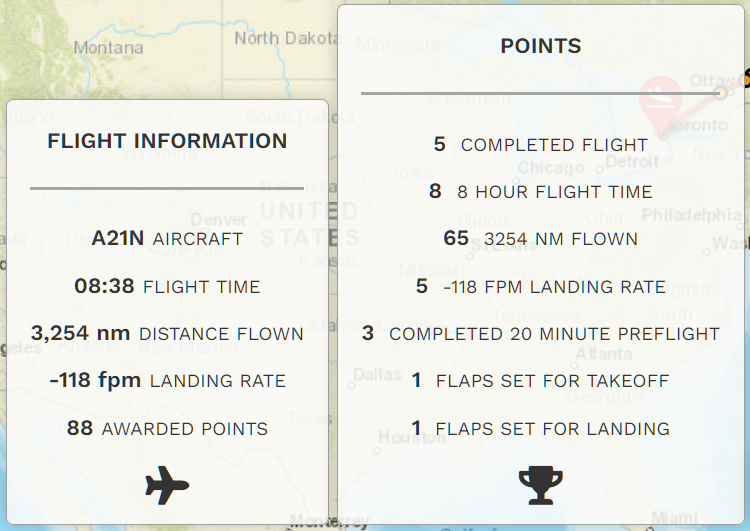
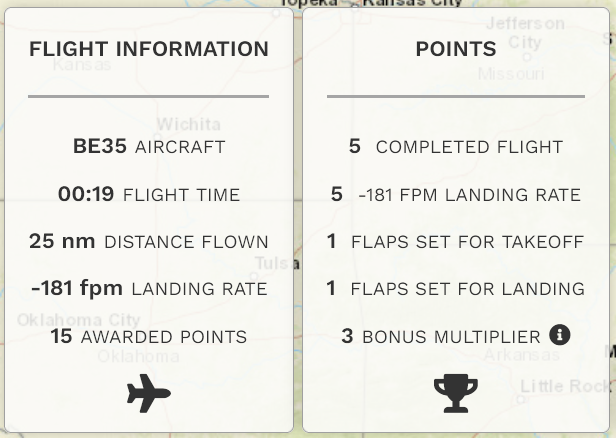
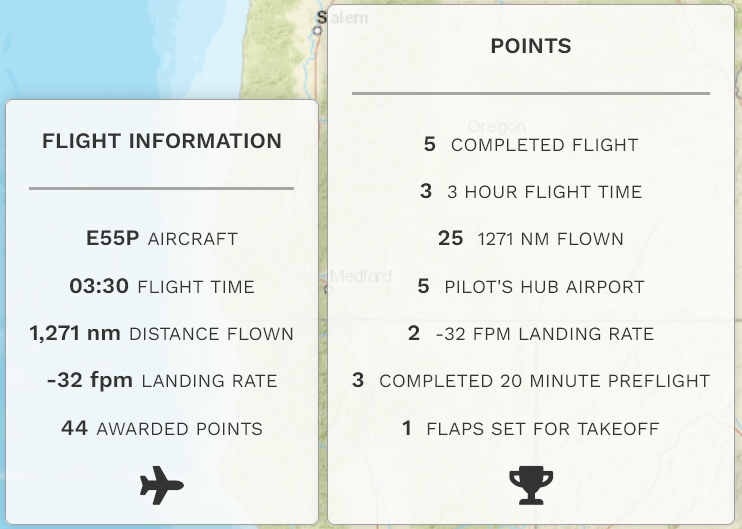
Here are some examples illustrating how these category points factor into each completed flight.
If you think your flight was graded incorrectly –– or –– you'd like to ask a question, submit a Help Ticket.