Flight Operations
What if my computer or flight simulator crashes?
This topic is covered in some detail within our Policies & Procedures Document. It may be found here.
What if I crash during one of my flights?
If you crash or have any other in-flight event preventing you from completing your flight as planned, you’ll need to cancel ACARS and restart that flight.
Is a Pilot allowed to change the simulation rate?
Changing the simulation rate during a flight is permitted as often as desired; however, a 15% penalty will be assessed against the total number of points earned for that flight if its use is detected by ACARS.
EXAMPLE: 53 points earned – 8 point penalty (.15 × 53) = 45 points awarded.
Changing the simulation rate is not permitted on any Tour flight. If you submit a PIREP and increase the simulation rate in any way, you’ll be required to re-fly that leg in order to advance in the Tour.
Do you allow a Pilot to pause the flight simulator while a flight is underway?
Yes. As long as you’re flying offline and don’t do anything to interrupt the operation of ACARS, you may pause your flight and resume it at any time afterwards without penalty.
If you’re flying online in a simulated, real-world environment, though, the Controllers at IVAO, PilotEdge, VATSIM will not likely be as accommodating. They typically do not allow flights to be paused.
IMPORTANT NOTE FOR MICORSOFT® FLIGHT SIMULATOR 2020 USERS: Pausing a flight while underway in a simulator is expected to stop the clock in smartCARS; however, it does not do that. Instead, the flight clock continues to run in smartCARS – the length of the pause is added to the overall flight time. For that reason, pausing is not permitted.
Can I fly flights to/from Hubs other than the one I was assigned?
Yes – though it’s important to point out Hubs are handled differently here than in nearly all other VAs.
The Hub you initially requested on your Application Form is your primary operating Hub and only needs to be used for your first Cargo and Scheduled flights. For Charter flights, a Hub holds no special or unique significance.
Once you’ve done that, you never have to return to it unless you wish to do so (and there’s a 5-point bonus for doing that). You’re allowed to fly flights starting or ending at any Hub you choose as long as there are flights in the schedule linking them.
I like flying helicopters. Can I fly them here?
Many of our Pilots enjoy flying helicopters and we’d really like to find a way to have them in the Fleet. However, during a series of flight tests we conducted, several system incompatibility issues arose that couldn’t be overcome with the current version of smartCARS. When the next version of smartCARS is released, we'll re-evaluate it, along with the resources required to integrate it into our system. At that time, a 'yes/no' decision will be made.
For now, though, helicopters may not be flown.
How are new aircraft added to the Walker Air Transport Fleet?
We’re aviation and flight simulation enthusiasts who enjoy flying aircraft of all kinds. Our Pilots are as well. As a result, we’re constantly evaluating freeware and payware aircraft Developers release and making our decision to add or not add them to our Fleet based on aircraft availability, operational factors and available resources.
If you’d like to make an aircraft-related suggestion (aircraft or livery), submit a Help Ticket.
Before submitting a request, though, please keep our Fleet Assignment Criteria in mind:
| Cargo | Charter | Scheduled |
|
In order for an aircraft to be added to the Cargo Fleet, it must have:
|
In order for an aircraft to be added to the Charter Fleet, it must have more than 2 and less than 30 seats. | In order for an aircraft to be added to the Scheduled Fleet, it must have 30 or more seats. |
Do you allow aircraft substitutions?
No. Our flight modules are built in a way substituting aircraft isn’t necessary.
If a PIREP documents a different aircraft than what was initially selected, it will be rejected.
Is it permissible for me to fly aircraft that aren’t in Walker Air Transport’s Fleet?
You can fly any aircraft you want at any time when not flying using our ACARS System.
When you fly using our ACARS System, though, you may only fly an aircraft specifically approved for a Cargo, Charter or Scheduled flight. In other words, if you don’t see a particular aircraft in a Fleet, then it can’t be flown. You may request it be added by completing a Help Ticket asking for it to be added to the Fleet.
There is no guarantee the aircraft will be added.
Additionally, that aircraft must also be flown in our bespoke livery. Any flight you complete while using our ACARS System in a non-Fleet aircraft – or one not in our livery – will be Rejected. And should this happen more than once, you risk being terminated.
I have an aircraft type listed in your Fleet who’s Developer I don’t see. Can I still fly it?
If you wish to fly an aircraft listed in our Cargo, Charter, and/or Scheduled Fleets created by a Developer that’s not noted/listed, you may submit a Help Ticket requesting it be added to the Fleet.
There is no guarantee the aircraft will be added.
You may not, however, under any circumstances whatsoever, fly an aircraft in our System without a Company livery.
Contact us at [email protected] – or – post a comment to #support in Discord if you have additional questions.
Do I have to fly my entire flight in a single session?
No. From a Company standpoint, you may begin a flight, pause and resume it at a later time as often as you think it necessary. As long as ACARS is not interrupted, you can complete the flight – and do so without penalty.
Make sure you review your flight simulator’s operating instructions to ensure pausing it will not interfere with the operation of ACARS.
Do I need to fly with online ATC?
No. We don’t require our Pilots to fly with online ATC. And while it’s always encouraged, there’s never any pressure for you to do so. To provide online ATC services for our Pilots, we’ve partnered with IVAO, PilotEdge and VASTSIM.
When I fly online, what should my Callsign be?
Whenever flying online, enter the following information in the remarks section of your pre-file.
CALLSIGN IS WALKER // VISIT US AT WALKERAIR US
Your Callsign will always be your Walker Air Transport Pilot ID.
If your assigned Pilot ID is WAT300, file your callsign as ‘Walker 300’ -- and use that Callsign for all radio calls.
My simulator crashed while I was almost finished with my flight. Can these hours be logged?
No. Manually-submitted PIREPs are not allowed because we don’t have a process in place to accommodate them nor do we have any plans to develop and implement an accommodation process.
Do I fly from gate-to-gate/stand-to-stand or from runway-to-runway?
We like to see our Pilots simulate real flight operations to the greatest degree possible. You will, however, always have the freedom to fly as you wish to fly. Complete your flight in any manner you like. Some considerations when doing so:
- Ideally, all Scheduled flights should begin at a gate/stand and end at a gate/stand (any one of your choosing);
- Ideally, all Cargo flights should originate on a Cargo Ramp (when available) and end at one;
- It's not mandatory, nor is it always realistic to do so, based on the limitations of a flight simulator’s airport scenery; and,
- Charter flights can originate from any location on an airport or airfield.
Because you may encounter something not addressed here or elsewhere, though, we always encourage you to use ‘Pilot discretion’ and good judgment.
How do I know which gates/stands to use?
It’s helpful to have an airport map to know where to taxi once you’ve exited the runway; however, as a practical matter, finding the first open gate will usually suffice. We do not 'own' any gates/stands at any airport.
How do you know I actually flew a flight?
We use ACARS to track all flights. As long as you remember to activate it before your aircraft begins to taxi (and submit it once it’s parked at your destination), your flight data will be logged – and we will know you actually flew a flight… You can confirm that yourself by reviewing the entries in your Pilot Logbook.
Someone told me about Worldwide Persistence. What exactly is it?
Worldwide Persistence is, quite simply, a setting forcing Charter Flights to be flown in a route-like manner similar to how Cargo and Scheduled Flights are flown.
Enable it and you’ll be required to depart from your previous flight’s arrival airport.
Disable it and depart from any of the 43,000+ airports in our database.
It may be enabled or disabled at any time. Visit your Profile page in Crew Ops to do so.
EXAMPLE: You land at KTIW | Tacoma Narrows Airport and plan your next Charter flight.
| If Worldwide Persistence is... | ... then the Departure Airport for your next flight is... |
| Enabled |
KTIW | Tacoma Narrows Airport. |
| Disabled | any airport in our database. |
With Worldwide Persistence enabled, Events and Tours are not affected.
I just landed in Salt Lake City and my Profile says I’m in Minneapolis. How do I fix that?
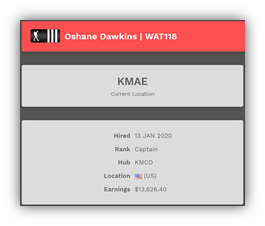
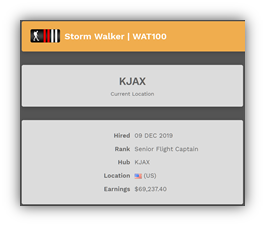
There’s actually nothing to fix. Your location -- ‘Current Location’ in the graphics below -- only changes when you complete a Cargo or Scheduled flight. It doesn’t change for Charter flights.
To see how this works, let’s take a look at some examples…
|
EXAMPLE ONE:
|
EXAMPLE TWO:
|
|
|
|