
X-Plane
There are a lot of modifications available in the X-Plane community from 3D engines to fuselage texturing. We try very hard to ensure that we provide you with textures for all of those. Please keep this in mind when you are downloading a livery, you may see a #Modifications folder inside the download link. In that you will often find things like Engine textures that are required if you installed an Engine Modification Package (such as the Carda engines for the Airbus.) You might also find "Raccoon Masks" too -- it truly depends on what the aircraft is.
Why do you provide engine textures? Most of the 3D engine model enhancements use different textures. And because we have a standard design, we must provide Black (Modern Livery) and White (Vintage Livery) textures for those mods. Otherwise, you will be flying our colors wrong. If you know anything by now, it's that we take great pride on how our liveries look.
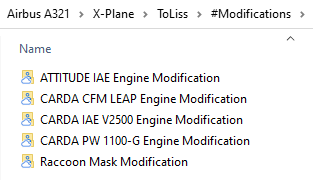
1. Download the livery that you wish to install from the Walker Air Transport site.
2. Open up the zip file of the downloaded aircraft.

Copy the folder above into the liveries folder of the aircraft as such:
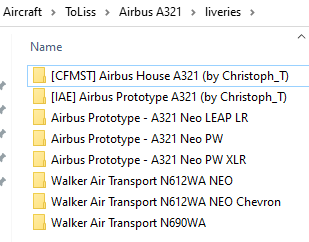
4. It is important that you do not nest the folders when you unzip, or copy, to your liveries folder. It should look exactly like the image below:
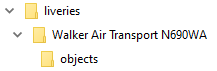
liveries > folder name of livery > objects
Load X-Plane and you should now see our livery for the aircraft you installed.