
Pilot Profile – Settings > Worldwide Persistence

What is it?Worldwide Persistence?

Worldwide Persistence (WWP) changesis a location tracking system used across Walker Air Transport.
When WWP is enabled for a flight type, your Charternext flight experiencemust indepart ourfrom airline.the airport where you last arrived.

By enabling it, your charter flight will be treated like our Cargo and Scheduled flights always use Worldwide Persistence. Your location persistence.updates Onceautomatically youwhen land,those flights are completed.

Charter, Assignments, Events, and Tours can optionally use Worldwide Persistence. You can enable or disable it for each module in your locationsettings.

will
be
How movedit toworks
that

When arrivalWorldwide airportPersistence andis yourenabled for a flight type:

    Your next chartered flight must department from there.

    Events and Tours are not affected by Worldwide Persistence, and therefore your location does not move.

    If you enable Worldwide Persistence, you’ll experience the following:

    • You’ll be required to depart from your last arrival airportairport.
    Your location updates after any completed flight or Jumpseat. Departure fields may be restricted or pre-filled based on your current location.

    Charter flights

      You must depart from your current location for all Charter flights. The departure airport field inis Charter flights will be disabledlocked and showdisplays your lastcurrent arrival airport, whether it was a flight you completed (in Cargo, Charter, or Scheduled) or a Jumpseat you purchased.airport. The 'Find a Flight'Flight departure field will beis disabled. The Jumpseat Airportaccess List will expandexpands to include all 55k+ airports in ourthe database.system.

      Assignments

        Departures are locked to your current location. You cannot disable WWP until this assignment is cancelled or completed. Available to Freedom to Fly subscribers only.

        Events

          Departures are locked to your current location when applicable. For Fly-Out and Specific events, bidding may be restricted if you are not at a valid departure airport.

          Tours

            Each tour leg must begin from your current location. A lockout is shown when your current airport does not match the required departure airport.

            Configuration

            Each module can be enabled or disabled independently in your settings.


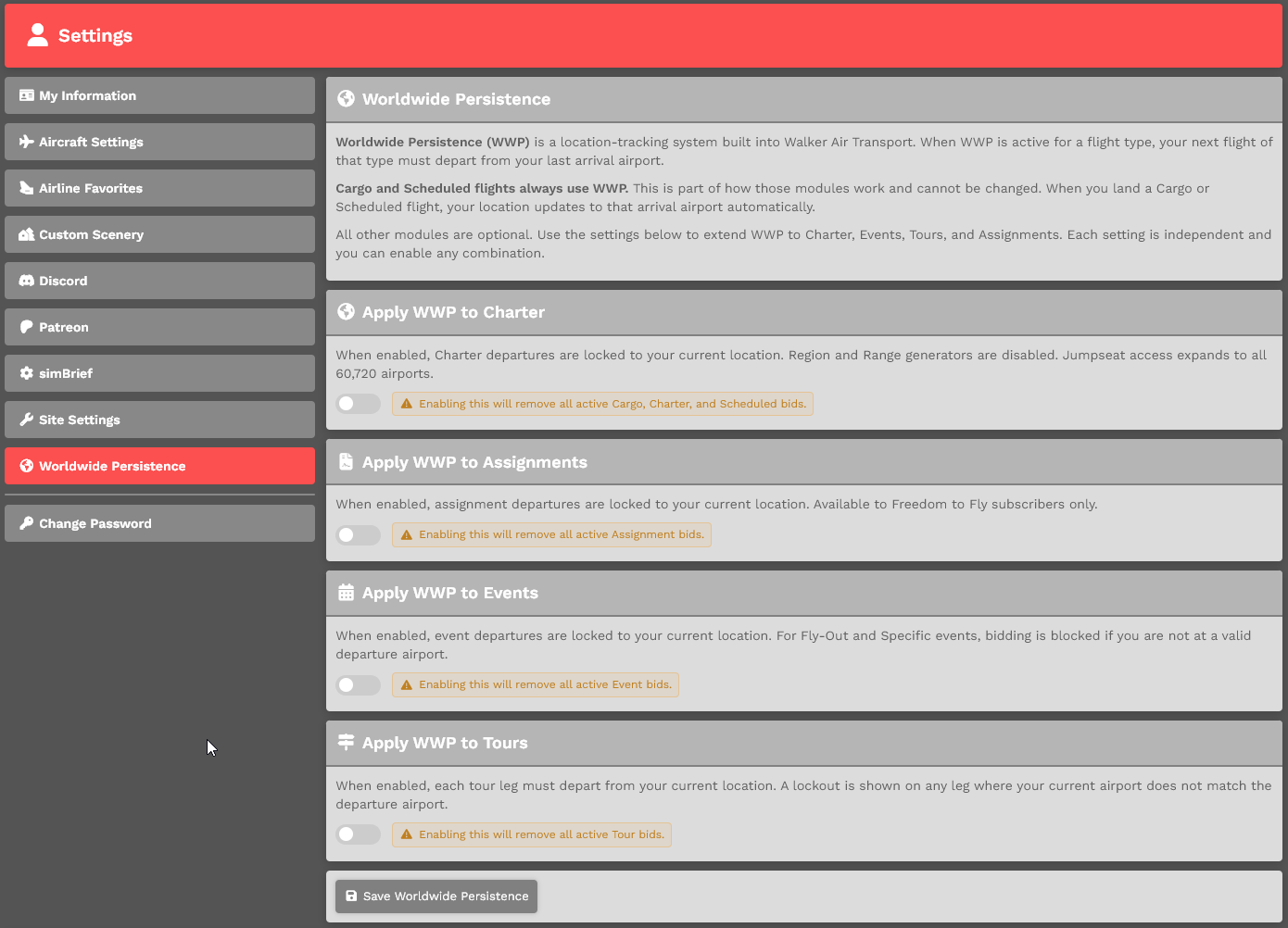
            Enable /or Disable OptionWorldwide Persistence – Within Pilot Settings

            You can enablemanage Worldwide Persistence by clickingin your namepilot insettings:

            the top right

            Profile > Settings > Worldwide Persistence.Persistence

            ToUse Enablethe thistoggle option,to enable or disable Worldwide Persistence, then click the toggle at the bottom of the image. Click the Save Settings button at the bottom of the page to saveapply your changes.

            If you do not click Save Settings, your changes will not be applied.


            What happens when enabled

            When Worldwide Persistence is enabled for a module:

              Your location updates after completing a flight or using Jumpseat. Your next flight in that module must depart from your current location. Departure fields may be locked or restricted based on your location.

              When disabled:

                Flights in that module can depart from any valid airport.

                Module control

                Worldwide Persistence can be enabled or disabled for each module individually:

                  Charter Assignments Events Tours

                  Each module follows its own setting.


                  Important

                  If you have an active flight, assignment, event, or tour that is using Worldwide Persistence, you may not be able to disable it.

                  To DisableIn this option,case:
                  click
                    The toggle will be disabled A message will explain why the togglesetting atcannot be changed You must complete or remove the bottomactive ofitem before changing the image.setting Click the Save Settings button at the bottom of the page to save it.

                    image.png


                    WithEnabling Worldwide Persistence...
                    ...

                    Worldwide whatPersistence happens?

                    can Ononly |be Enabledenabled Yourwhen locationyou are not actively flying a bid.

                    When you enable Worldwide Persistence or its modules:

                      You must not be in an active flight Existing bids may be cleared to enforce a single active flight You will be movedlimited ifto one active WWP flight at a time across enabled modules
                      Disabling Worldwide Persistence

                      When you completedisable Worldwide Persistence or one of its modules:

                        Any active bids that are not currently in flight will have Worldwide Persistence removed Flights already in progress will continue under their current rules until completed

                        Bid Lockout

                        When Worldwide Persistence (WWP) is enabled, you can only have one active WWP flight at a chartertime across all enabled modules.

                        If you already have an active WWP flight, and you will be requiredunable to departstart another flight in any module that also has WWP enabled.

                        To continue, you must either:

                          Complete your current flight Cancel your current flight or bid

                          This restriction applies based on your enabled modules. For example, if WWP is enabled for both Charter and Assignments, an active Charter flight will prevent you from thatstarting locationan next.

                          Assignment, Offand |vice Disabled You can department from any airfield in the Charter module.

                          If you do not click the Save Settings button, the option you selected – Enable or Disable – will not appear.versa.
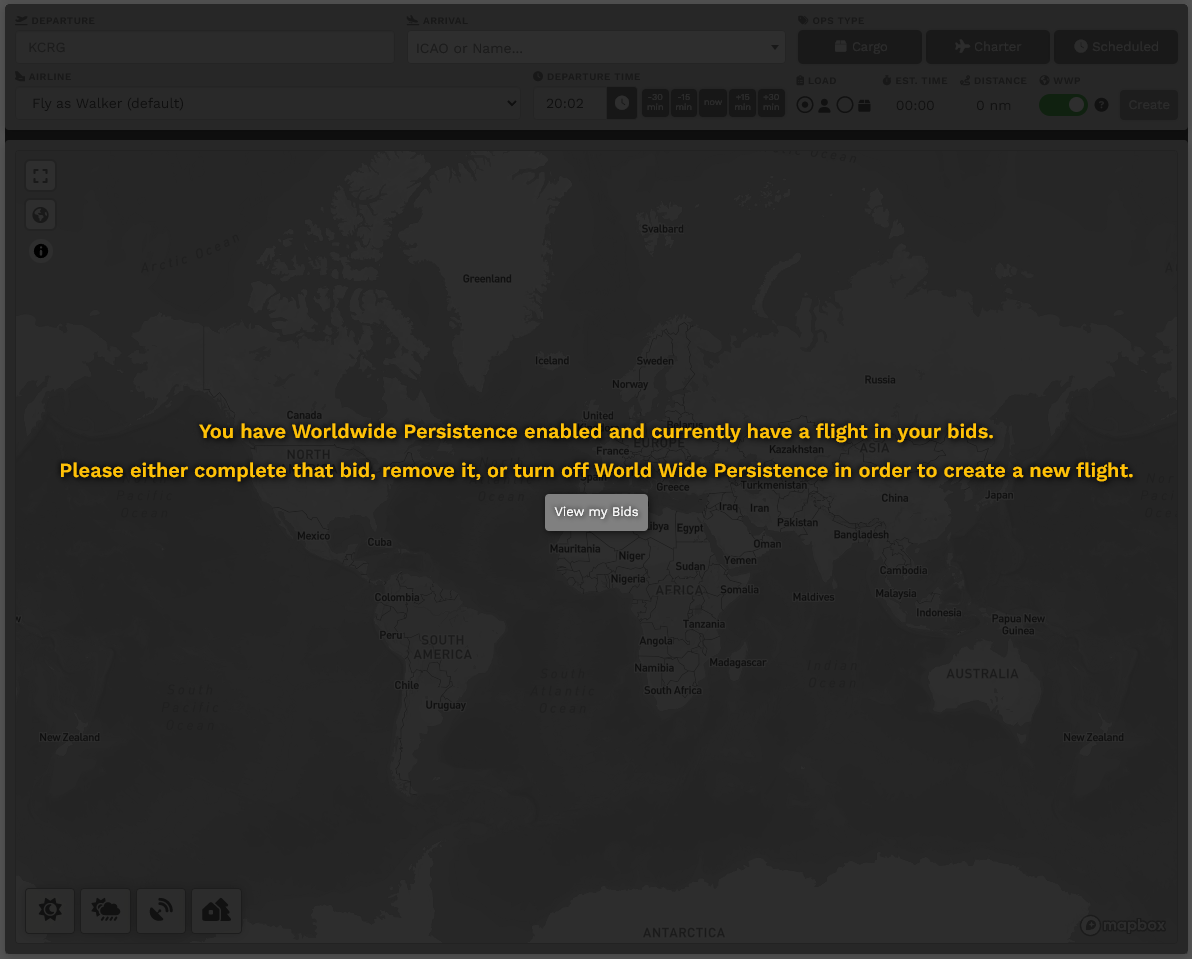
                          image-1691179473727.pngimage.png