
Diversions and Emergencies
If you experience an in-flight emergency, treat it as a real life experience. You may find the information below to be helpful in your recovery planning.
ACARS = smartCARS or FlightTrackerXP
Once you arrive at your final destination and land, take a moment to review the ACARS log to ensure its entries appear to be normal and logically sequenced.
| If Log entries look: | Action Step |
| Normal | Submit the PIREP. As noted above, if your landing has not exceeded the Company’s Landing Rate Standard, it’ll be automatically approved. |
| Not Normal | Click Cancel. Manual PIREPS are not allowed under any conditions. |
PIREP REVIEWS: We certainly sympathize with you if something appears abnormal in your PIREP. However, we do not have any control over the operation and functionality of your computer, the stability of your flight simulator and addons, the performance of your Internet connection or any other operational factors affecting how data is collected and transmitted to us. As a result, we must trust the data your flight simulator generates and transmits to us via ACARS to be an accurate representation of what occurred during your flight. After that transmission occurs, we do not have the ability to change or alter any flight data nor will we ever do so.
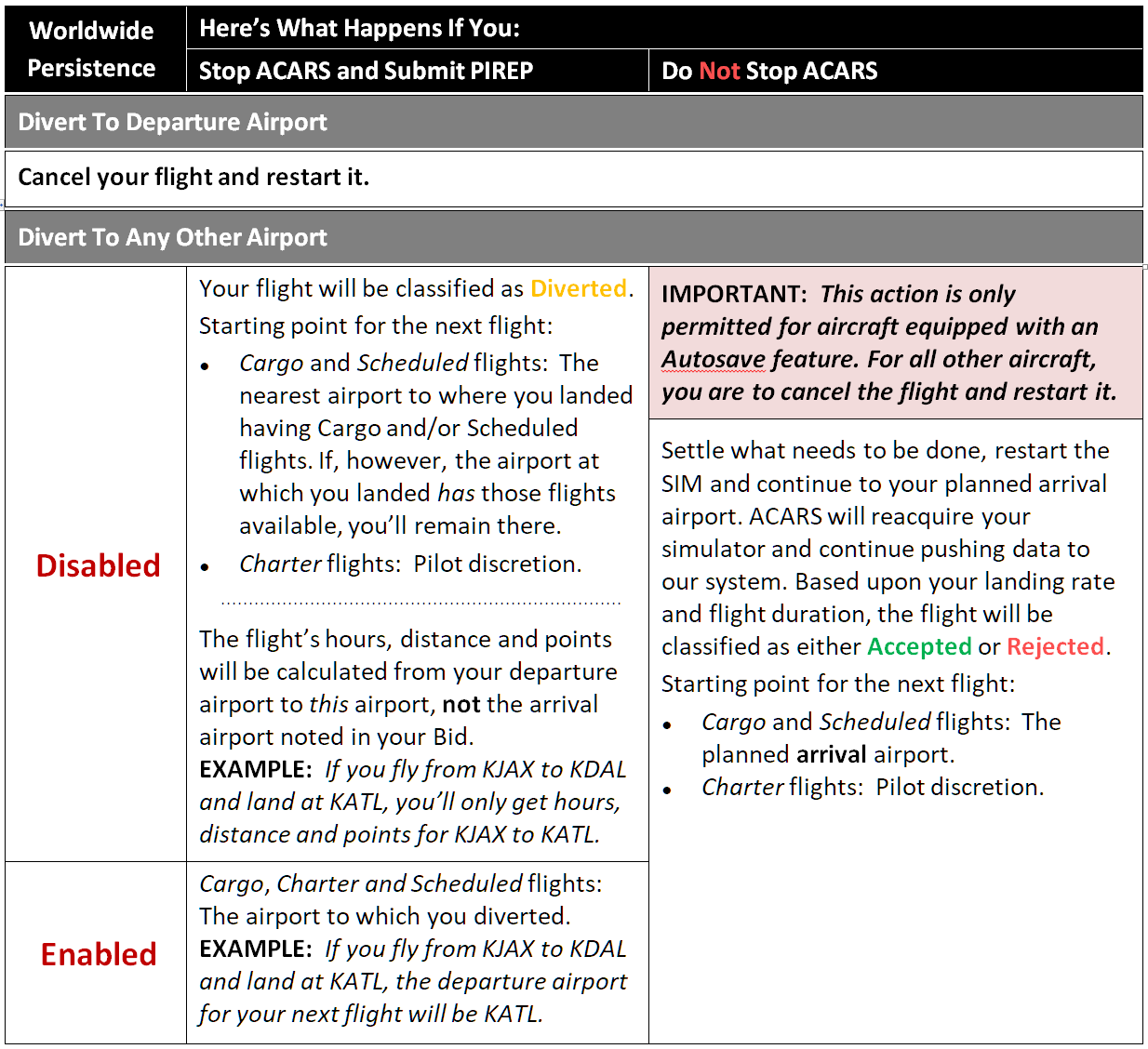
Afterwards, if you review the PIREP and flight tracker map, you’ll see where you landed at the interim airport and subsequently continued to your final destination.
If you experience difficulties with this process or ACARS, submit a Help Ticket for assistance.
PIREP Flight Time 00:00 Entry
If you see a Flight Time 00:00 entry in your PIREP, then, to ACARS, it means you triggered a landing before you took off. It can happen in a number of ways while flight logging is taking place – for instance, by moving the plane or hitting bad airport mesh during your taxi to the runway or on the takeoff roll. The PIREP will be automatically rejected.
Manual changes cannot and will not be made.
TIP: Make it a habit to check your Flight Log immediately before and after takeoff – and regularly throughout your flight – in order to avoid time-wasting instances like this resulting in rejected PIREPS.