
Getting Started
I’m signed up and want to take my first flight. Now what?
The steps you need to take to prepare yourself for your first flight are detailed in our New Pilot Orientation document. It may be found here.
Review it carefully. Afterwards, if you have any questions, complete and submit a Help Ticket – or – contact us at [email protected].
Can I start flying immediately?
Yes; however, we very strongly recommend reading our New Pilot Orientation document before doing so. It may be found here
Once you've finished that, you’re all set. Bid your flight, fly it – and have fun!
How do I find flights to fly?
The process of finding a flight is covered in great detail in our New Pilot Orientation document. It may be found here.
Where can I get weather reports for my flights?
There are a number of sources you may use to obtain weather reports for your flight. Flight simulators typically allow weather to be generated realistically using internal weather generation methods. In addition to a number of free, online resources, there are also a number of payware addons that can be used to receive up-to-the-minute weather information.
What if I can't find a suitable Cargo or Scheduled flight to fly?
You always have the option to create, bid and fly a Charter flight. You may also purchase a Jumpseat and explore flight options at another airport.
Learn more about Jumpseats here.
Can I start my flight early?
Yes. Actually, you may start your flight at any convenient time so there won’t be clashes or conflicts with what you have going on in your real-world life. This is, after all, a virtual environment, not a real one – and, more than anything else, it’s about having fun.
Flight times shown in Crew Ops are displayed in UTC. This is simulator time, not real-world time. If a flight is scheduled to depart at 1600 UTC, we encourage you to fly it at that time to enhance the overall experience; however, that’s not mandated.
I completed a bid on a flight, but it looks like I’m not going to be able to fly it. Now what do I do?
You don’t have to do anything. It will remain in your Completed Bids page for 48 hours. If you don’t complete the flight before that time period expires, it will be automatically deleted – or you may go to My Bids and manually delete it.
Tour bids do not expire.
Will my bid expire if I don't complete the flight?
It will be saved in your Completed Bids page for 48 hours. After that, it’ll be automatically deleted. If you wish to bid the same flight at a later date, you’ll need to re-enter it.
Tour bids do not expire.
How long before a scheduled flight’s departure time can I bid on it?
You can create and submit a bid on any Cargo and/or Scheduled flight at any time. Once the bid has been submitted, you can fly it immediately, irrespective of the published departure time.
Do I have to use real airport charts and maps when flying for Walker Air Transport?
No – although a number of our Pilots choose to enhance their experience with us by doing so and find it useful and rewarding. It’s completely up to you. Their use, however, can certainly add an element of realism to your flying experience.
When flying online with IVAO, PilotEdge and VATSIM, though, you’ll probably need them when you arrive or depart under the ATC guidance they provide.
By the way – many of these items can be downloaded from the Internet at no cost.
How can I obtain airport charts?
Airport Charts suitable for simulation purposes are typically available within your flight simulator. There are also many other options – free and subscription-based – that can be explored using the Internet.
Does Walker Air Transport use ACARS (flight tracking software) Programs?
Yes. We currently utilize TFDi Design’s smartCARS program and FlightTrackerXP, an ACARS-compatible flight tracker for MacOS (X-Plane 11 only). They seamlessly interface with our custom-designed and automated Flight Data System by pulling flight data directly into our database, enabling us to create PIREPs and populate the Crew Ops website with data. That allows you to concentrate on flying, not manually completing and filing reports.
What’s a PIREP?
A PIREP is, quite simply, a Pilot Report. It contains digital data about the flight you flew and completed. After processing that data in our automated, proprietary system, it’s immediately filed, at which time it’s also added to your Pilot Logbook and is available for review.
When will my PIREP be posted to my Flight Log?
Instantly. We use a custom-designed, automated PIREP system that, with the simple click of a couple of buttons, files it before you ever leave your aircraft at the end of a flight.
How do I file a PIREP?
You don’t ever need nor will you ever be able to manually file a PIREP – our automated, proprietary system does that for you. Click a couple of buttons once your aircraft has come to a stop and it's done.
When will my PIREP be approved?
Technically, all PIREPS are automatically processed and approved once they’re submitted.
Depending on a number of factors, though, a PIREP will be classified in one (1) of the following ways:
| Approved | Rejected | Diverted |
The criteria used to make that decision is as follows.
| Approved | Rejected | Diverted |
|
The criteria for an Approved flight are:
All Points, Flight Hours and Pay are awarded.
The PIREP is posted to your Logbook as being Completed | Approved. |
The criteria for a Rejected flight are:
No Points, Flight Hours or Pay are awarded.
The PIREP is posted to the your Logbook as being Completed | Rejected. |
No Points or Flight Hours are awarded.
|
What if I disagree with what the PIREP says about my flight? Is there a Formal Review process?
Data generated by your flight simulator about your flight is transferred, via ACARS, to our automated Flight Data System for processing. It's that data transfer that enables us to create the PIREP you see and what’s posted in your Logbook.
The control inputs you make in your flight simulator while flying are the only manual elements of the data recording and transmission process – everything else is data driven.
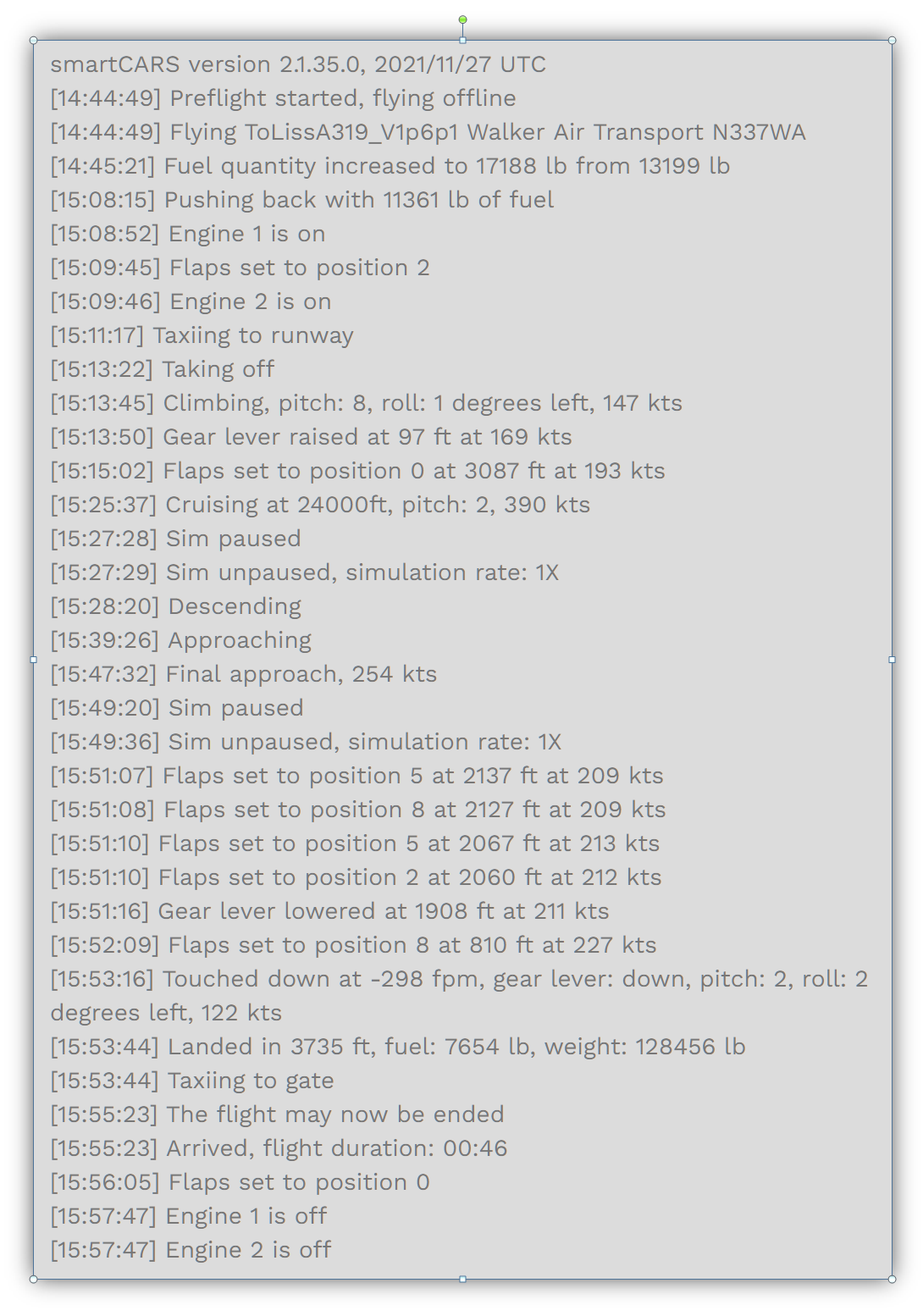
Once you arrive at your final destination, land and taxi to a stop. Before doing anything else, take a moment to review your ACARS log to ensure its entries look normal.
Here's an example of a typical ACARS Flight Log whose entries appear to be Normal. Each entry represents a data point the Sim transmitted to our Flight Data System, and its that data we used to generate the PIREP.
| Entries Look Normal |
Submit the PIREP. |
| Entries Don't Look Normal |
Click Cancel. Doing so will not affect your Logbook in any way – it’ll be like the flight never occurred. |
We recognize, however, there could be an occasion where something doesn’t look right at the end of your flight. In the example illustrated below, something was obviously amiss – it’s not possible to be taxiing to the gate, and, after a brief pause, becoming airborne again…
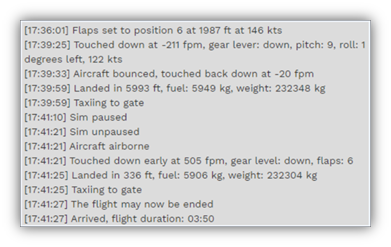
While exceedingly rare, these kinds of anomalies can occasionally occur. We certainly sympathize with you if something like this happens. However, no Formal Review process exists because we do not have any control over the operation of your computer, your flight simulator, the stability of your Internet connection and/or any other operational factors affecting how data is collected and transmitted to us. As a result, we must trust the data your flight simulator generates and transmits to us via ACARS to be an accurate representation of what occurred during your flight. After that transmission occurs, we do not have the ability to change or alter any flight data nor will we ever do so.
Something doesn’t look right to me on the PIREP for the flight I just completed. What do I do?
We certainly sympathize with you if something like this occurs. However, we do not have any control over the operation of your computer, your flight simulator, the stability of your Internet connection and/or any other operational factors affecting how data is collected and transmitted to us. As a result, we must trust the data your flight simulator generates and transmits to our Flight Data System via ACARS to be an accurate representation of what occurred during your flight. After that transmission occurs, though, we do not have the ability to change or alter any flight data nor will we ever do so.
What to do?
Simply stated, you’ll need to re-fly that flight.