# Tours

---

A **Tour** provides an opportunity for a pilot to discover the world in a new and unique way. Each one is themed, and unless specified differently, can be completed in an aircraft from *any* of the company's fleets. They are comprised of planned legs, each of which must be flown in the order specified. Once all legs have been completed, an [**award**](https://docs.walkerair.us/books/3-help/page/awards) is posted to a pilot's [**Logbook**](https://docs.walkerair.us/books/2-training/page/pilot-profile-logbook) and the pilot is awarded 5 bonus points for each leg of the tour.

<p class="callout warning">The bonus points is only awarded at the end of the tour, and not everytime you finish one leg. Additionally, this will only be added after you complete another flight (after the last tour flight) or during the server's maintenance refresh.</p>

To explore our **Tours** offerings, click [**Tours**](https://crew.walkerair.us/tours).

The default view is for all **Tours** to be displayed. Once you begin flying them, though, you may find it useful and/or convenient to be able to sort them. We have an assortment of fields for you to narrow down your options.

<p class="callout info">The numbers beside some of the drop down options indicate the number of tours that are under that filter - however note that if you have multiple filters selected, it will still only show what satisfies that single filter, and not all filters.</p>

[![image-1757331286176.png](https://docs.walkerair.us/uploads/images/gallery/2025-09/scaled-1680-/image-1757331286176.png)](https://docs.walkerair.us/uploads/images/gallery/2025-09/image-1757331286176.png)

<table id="bkmrk-all-available-in-pro" style="border-collapse: collapse; width: 100%; height: 1113px;"><tbody><tr style="height: 126px;"><td class="align-center" style="width: 22.3248%; vertical-align: middle; height: 126px;">[![image-1757331346874.png](https://docs.walkerair.us/uploads/images/gallery/2025-09/scaled-1680-/image-1757331346874.png)](https://docs.walkerair.us/uploads/images/gallery/2025-09/image-1757331346874.png)

</td><td style="width: 37.7948%; vertical-align: middle; height: 126px;">**Name -** Self-explanatory, this searches and filters based on characters inputted in the text field.

</td></tr><tr style="height: 467px;"><td style="width: 22.3248%; vertical-align: middle; height: 467px;">[![image-1757331397261.png](https://docs.walkerair.us/uploads/images/gallery/2025-09/scaled-1680-/image-1757331397261.png)](https://docs.walkerair.us/uploads/images/gallery/2025-09/image-1757331397261.png)

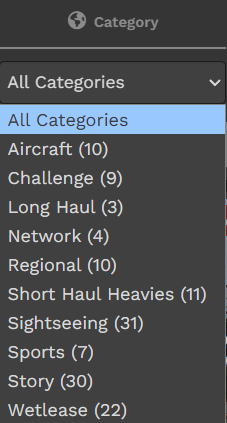
</td><td style="width: 37.7948%; vertical-align: middle; height: 467px;">**Category -** These are general categories that we have, based on the tour.

- **Aircraft** - These are tours themed around a certain aircraft and its operations.
- **Challenge -** These tours bring you to places with something challenging, be they hard approaches, oil rig landings, etc.
- **Long** **haul** - These are tours that are designed to push aircraft and pilots to the limit time-wise.
- **Network** - These are tours that revolve around multiplayer network (VATSIM, IVAO, PilotEdge) initiatives. You do not have to be on-network to fly these tours.
- **Regional** - These are tours that see yourself flying around certain regions doing commercial work.
- **Short Haul Heavies** - These are tours that mirror real life services where heavies/widebody aircraft are used on short flights.
- **Sightseeing** - These tours take you around certain places to appreciate the views and the area.
- **Sports** - These tours have stories that revolve around certain sports leagues.
- **Story** - These tours have stories behind them - read the tour description for more info!
- **Wetlease** - These tours put you in the seat of a standard line pilot, flying routes that airlines fly IRL. You may fly this in Walker livery as a wetlease, or use the <span style="text-decoration: underline;">**[Patreon](https://docs.walkerair.us/books/3-help/page/what-is-patreon)**</span> benefit and fly using the real airline's livery and callsign.

</td></tr><tr style="height: 415px;"><td style="width: 22.3248%; vertical-align: middle; height: 415px;">[![image-1757331883782.png](https://docs.walkerair.us/uploads/images/gallery/2025-09/scaled-1680-/image-1757331883782.png)](https://docs.walkerair.us/uploads/images/gallery/2025-09/image-1757331883782.png)

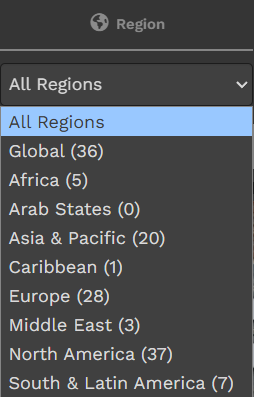
</td><td style="width: 37.7948%; vertical-align: middle; height: 415px;">**Region** - What area of the world will you find yourself flying in while doing the tour

</td></tr><tr style="height: 35px;"><td style="width: 22.3248%; vertical-align: middle; height: 35px;">[![image-1757331915598.png](https://docs.walkerair.us/uploads/images/gallery/2025-09/scaled-1680-/image-1757331915598.png)](https://docs.walkerair.us/uploads/images/gallery/2025-09/image-1757331915598.png)

</td><td style="width: 37.7948%; vertical-align: middle; height: 35px;">**Legs -** Number of legs in the tour

</td></tr><tr style="height: 35px;"><td style="width: 22.3248%; vertical-align: middle; height: 35px;">[![image-1757331938960.png](https://docs.walkerair.us/uploads/images/gallery/2025-09/scaled-1680-/image-1757331938960.png)](https://docs.walkerair.us/uploads/images/gallery/2025-09/image-1757331938960.png)

</td><td style="width: 37.7948%; vertical-align: middle; height: 35px;">**Distance-** Combined total distance of all legs in the tour

</td></tr><tr style="height: 35px;"><td style="width: 22.3248%; vertical-align: middle; height: 35px;">[![image-1757331978197.png](https://docs.walkerair.us/uploads/images/gallery/2025-09/scaled-1680-/image-1757331978197.png)](https://docs.walkerair.us/uploads/images/gallery/2025-09/image-1757331978197.png)

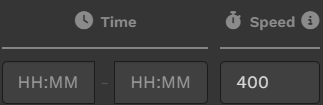
</td><td style="width: 37.7948%; vertical-align: middle; height: 35px;">**Time and Speed -** Time filters by expected tour duration, however this is reliant on the speed (in **kts**) that you enter on the speed box. This allows you to finetune whether you plan to fly GA, heli, prop or jets.

</td></tr><tr><td style="width: 22.3248%; vertical-align: middle;">[![image-1757332048292.png](https://docs.walkerair.us/uploads/images/gallery/2025-09/scaled-1680-/image-1757332048292.png)](https://docs.walkerair.us/uploads/images/gallery/2025-09/image-1757332048292.png)

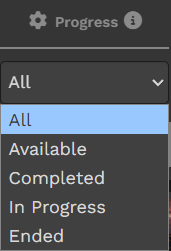
</td><td style="width: 37.7948%; vertical-align: middle;">**Progress -** This lets you filter tours as per the dropdown options.

</td></tr><tr><td style="width: 22.3248%; vertical-align: middle;">[![image-1757332077094.png](https://docs.walkerair.us/uploads/images/gallery/2025-09/scaled-1680-/image-1757332077094.png)](https://docs.walkerair.us/uploads/images/gallery/2025-09/image-1757332077094.png)

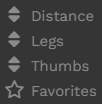
</td><td style="width: 37.7948%; vertical-align: middle;">**Sort Buttons -** This allows you to sort the currently filtered tours by distance, number of legs, number of thumbs (community upvotes) and *favorites (future feature)* that you have marked.

</td></tr></tbody></table>

[![image-1757332480291.png](https://docs.walkerair.us/uploads/images/gallery/2025-09/scaled-1680-/image-1757332480291.png)](https://docs.walkerair.us/uploads/images/gallery/2025-09/image-1757332480291.png)

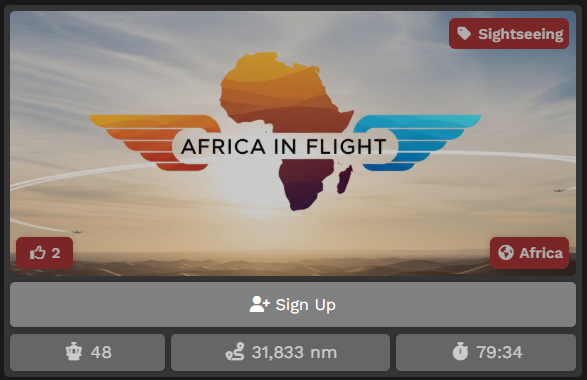
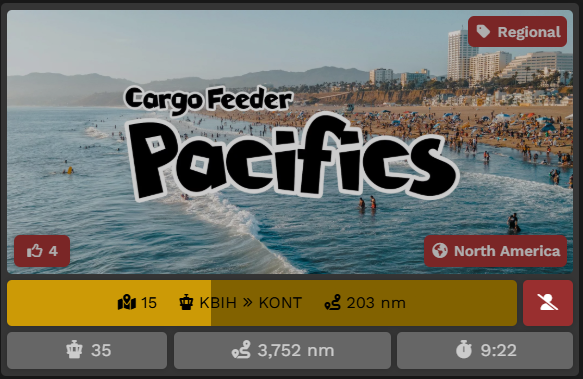
Each tour panel will show you a number of information.

**On the Image itself**  
Upper Left - This will show a red box with <span style="color: #ffffff; background-color: #800000;">NEW</span> if the tour has been recently launched.  
Upper Right - This will show the category of tour, as discussed in the section above  
Lower Left - This will show a like icon, showing how many other pilots upvoted the tour. You can also hit this button to add your vote - doing this will fill the icon in.  
Lower Right - This shows the region of the tour, as discussed in the section above.

**Status Bar**  
Each **Tour** has a status. It's either <span style="color: #808080;">**Available**</span>, <span style="color: #ffc107;">**In Progress**</span> or <span style="color: #2b982b;">**Completed**</span> – and each is anchored by a colored bar providing you a visual indicator of its status.

For <span style="color: #808080;">**Available**</span> tours, clicking this bar will allow you to sign up for the tour.  
For <span style="color: #ffc107;">**In Progress**</span> tours, the bar will show your current progress as the loading bar, your next tour leg, and the distance of your next leg.  
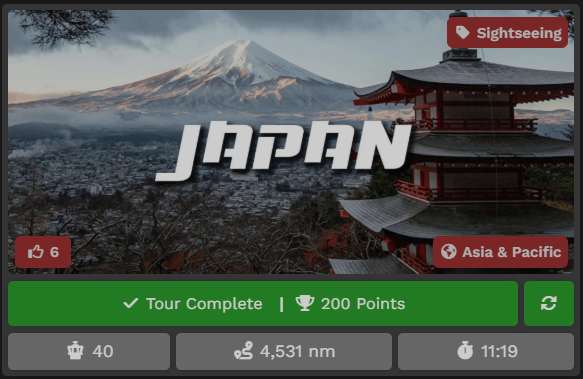
For <span style="color: #2b982b;">**Completed**</span> tours, it will show you the amount of bonus points you earned by completing the tour.

<table id="bkmrk-tour-status%3A-availab" style="border-collapse: collapse; width: 100%; height: 57px;"><tbody><tr style="height: 29px;"><td class="align-right" style="width: 25%; background-color: #000000; height: 29px;"><span style="color: #ffffff;">**Tour Status:**</span></td><td class="align-center" style="width: 25%; background-color: #808080; height: 29px;"><span style="color: #ffffff;">**Available**</span></td><td class="align-center" style="width: 25%; background-color: #ffc107; height: 29px;"><span style="color: #000000;">**In Progress**</span></td><td class="align-center" style="width: 25%; background-color: #2b982b; height: 29px;"><span style="color: #ffffff;">**Completed**</span></td></tr><tr style="height: 28px;"><td class="align-right" style="width: 25%; background-color: #000000; height: 28px;"><span style="color: #ffffff;">**Completion Status:**</span></td><td class="align-center" style="width: 25%; background-color: #808080; height: 28px;"><span style="color: #ffffff;">**Grey**</span></td><td class="align-center" style="width: 25%; background-color: #ffc107; height: 28px;"><span style="color: #000000;">**Yellow**</span></td><td class="align-center" style="width: 25%; background-color: #2b982b; height: 28px;"><span style="color: #ffffff;">**Green**</span></td></tr></tbody></table>

Below are samples of what you may see in your tours page.

<table id="bkmrk-available-in-progres" style="border-collapse: collapse; width: 100%;"><tbody><tr><td class="align-center" style="width: 33.3333%; background-color: #808080;"><span style="color: #ffffff;">**Available**</span></td><td class="align-center" style="width: 33.3333%; background-color: #ffc107;"><span style="color: #000000;">**In Progress**</span></td><td class="align-center" style="width: 33.3333%; background-color: #2b982b;"><span style="color: #ffffff;">**Completed**</span></td></tr><tr><td style="width: 33.3333%;">[![image-1757332189957.png](https://docs.walkerair.us/uploads/images/gallery/2025-09/scaled-1680-/image-1757332189957.png)](https://docs.walkerair.us/uploads/images/gallery/2025-09/image-1757332189957.png)

</td><td style="width: 33.3333%;">[![image-1757332210187.png](https://docs.walkerair.us/uploads/images/gallery/2025-09/scaled-1680-/image-1757332210187.png)](https://docs.walkerair.us/uploads/images/gallery/2025-09/image-1757332210187.png)

</td><td style="width: 33.3333%;">[![image-1757332229631.png](https://docs.walkerair.us/uploads/images/gallery/2025-09/scaled-1680-/image-1757332229631.png)](https://docs.walkerair.us/uploads/images/gallery/2025-09/image-1757332229631.png)

</td></tr></tbody></table>


---

#### **Individual Tour Page**

To learn more about a specific **Tour**, click its image on the **Tour** page.

After doing so, the screen below will open. In it, there are three areas on the page.

---

##### <span style="color: #ffffff;">**Area 1** | **Tour Description**</span>

Click **Tour Description** beneath the *Tour Image*. After doing so, its description will appear. This will provide an narrative overview of the **Tour**. If you see a yellow Tour Description notice, as below, you are highly enjoined to open the tour description as it contains information regarding add-on mods required, or possible ICAO differences in certain simulators.

[![image-1757334189541.png](https://docs.walkerair.us/uploads/images/gallery/2025-09/scaled-1680-/image-1757334189541.png)](https://docs.walkerair.us/uploads/images/gallery/2025-09/image-1757334189541.png)

You may see the allowed aircraft for the tour by hovering over the three green boxes or the "Specific Aircraft Only" buttons on the right, on top of the legs list.

[![image-1757333355583.png](https://docs.walkerair.us/uploads/images/gallery/2025-09/scaled-1680-/image-1757333355583.png)](https://docs.walkerair.us/uploads/images/gallery/2025-09/image-1757333355583.png)

[![image-1757333350015.png](https://docs.walkerair.us/uploads/images/gallery/2025-09/scaled-1680-/image-1757333350015.png)](https://docs.walkerair.us/uploads/images/gallery/2025-09/image-1757333350015.png)

If you wish to sign up for the Tour, click the **Sign** Up bar. After doing so, you'll note two new things in the page that opens.

<table id="bkmrk-1.-if-you-change-you" style="border-collapse: collapse; width: 100%;"><tbody><tr><td class="align-center" style="width: 5.92593%;">**1.**</td><td style="width: 94.0741%;">If you change your mind about completing the **Tour** *at any time* after signing up for it, click the **Leave this Tour?** button and you'll be removed from it.

[![image-1637958013759.png](https://docs.walkerair.us/uploads/images/gallery/2021-11/scaled-1680-/image-1637958013759.png)](https://docs.walkerair.us/uploads/images/gallery/2021-11/image-1637958013759.png)

</td></tr><tr><td class="align-center" style="width: 5.92593%;">**2.** </td><td style="width: 94.0741%;">The **Tour's** *First Leg* will now have a *grey aircraft icon* button. That means you may bid this leg.

</td></tr></tbody></table>

<p class="callout info">***Tour Legs** must be completed in the order they're sequenced. You will **not** be able to skip around once you begin.*</p>

To bid a Tour Leg, click the *grey aircraft icon* button.

[![image-1757333256712.png](https://docs.walkerair.us/uploads/images/gallery/2025-09/scaled-1680-/image-1757333256712.png)](https://docs.walkerair.us/uploads/images/gallery/2025-09/image-1757333256712.png)
Afterwards, the screen below will open. From here, it is the standard flight bidding process. You may refer [<span style="text-decoration: underline;">**here**</span>](https://docs.walkerair.us/link/15#bkmrk-how-do-i-bid%3F-simply) if unfamiliar.

[![image-1757333448992.png](https://docs.walkerair.us/uploads/images/gallery/2025-09/scaled-1680-/image-1757333448992.png)](https://docs.walkerair.us/uploads/images/gallery/2025-09/image-1757333448992.png)
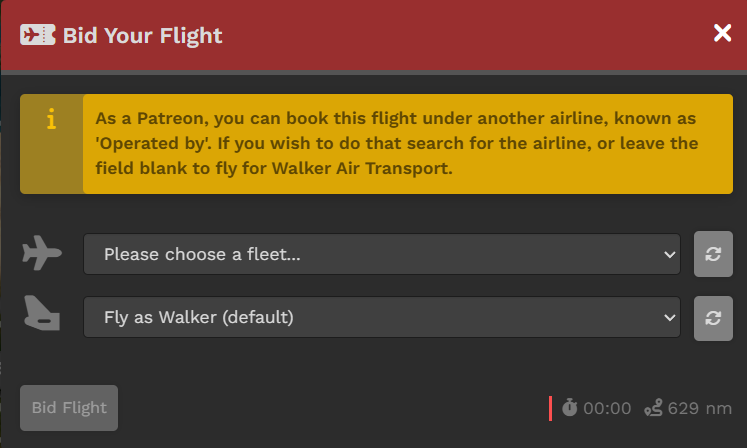
<p class="callout info">*Note that if you are not a Patreon, you will not have the second dropdown box available and will instead see a notice about livery use.*</p>

---

And about the colored buttons... Here's another example of a Pilot currently flying a **Tour** we can use as an illustration:

[![image-1757333685877.png](https://docs.walkerair.us/uploads/images/gallery/2025-09/scaled-1680-/image-1757333685877.png)](https://docs.walkerair.us/uploads/images/gallery/2025-09/image-1757333685877.png)
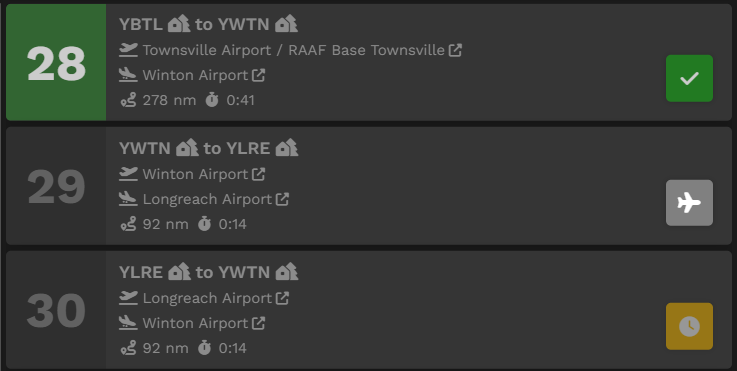
**Leg 28** has a *green check mark* icon indicating that leg has been Completed.

**Leg 29** has a *gray aircraft* icon indicating that leg can be bidded and is available to be flown. Once a bid is in place, the icon will turn red. [![image-1757333731141.png](https://docs.walkerair.us/uploads/images/gallery/2025-09/scaled-1680-/image-1757333731141.png)](https://docs.walkerair.us/uploads/images/gallery/2025-09/image-1757333731141.png)

**Leg 30** has a *yellow clock* icon indicating it may **not** be bid upon unless/until Leg 29's flight has been completed.


---

##### <span style="color: #ffffff;">**Area 2** | **Tour Map &amp; Legs**</span>

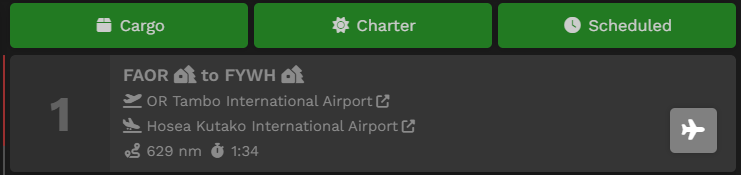
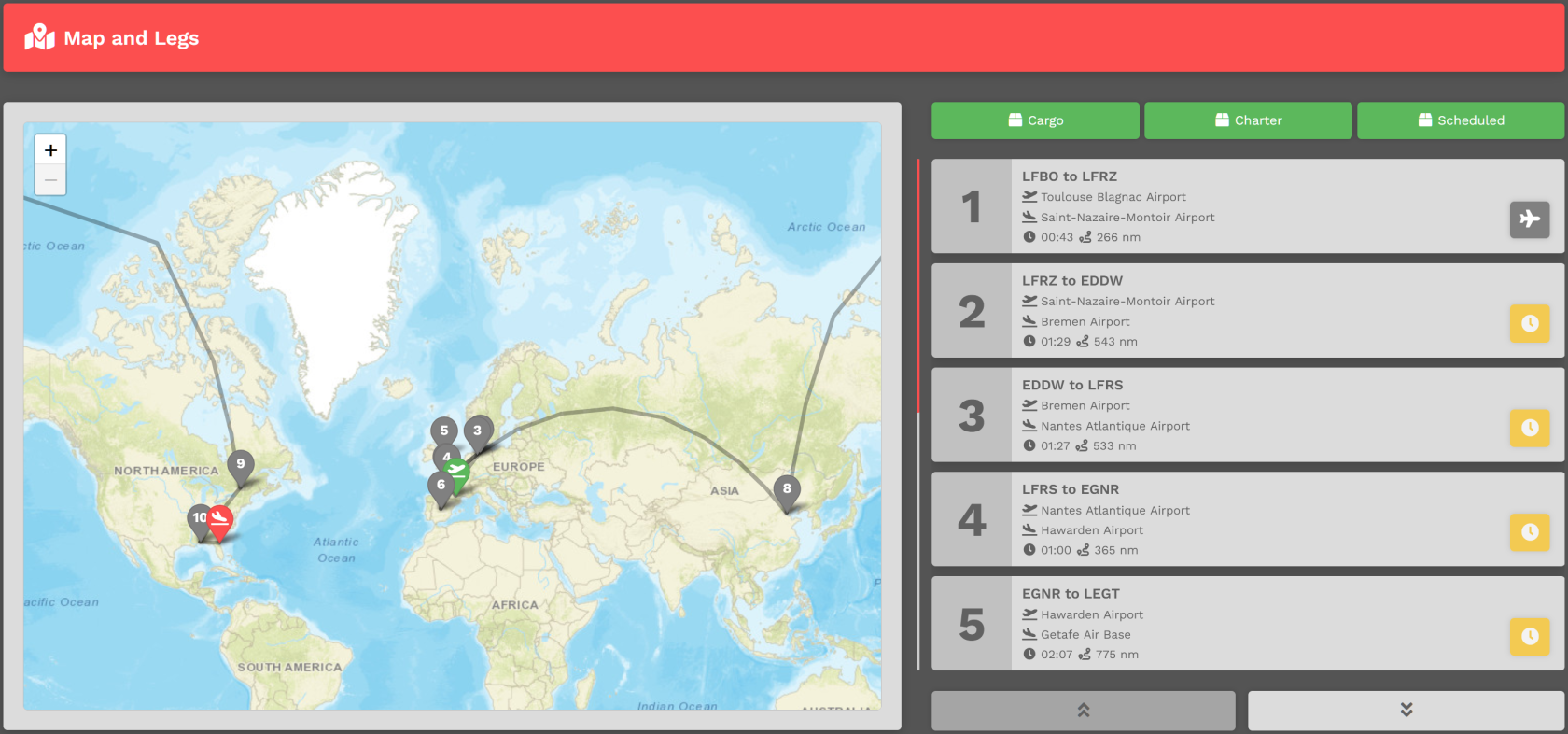
In this area of the **Tour Page**, a map identifying the Legs and their location is presented.

To its right is the list of **Tour Legs**. Each is numbered and must be flown in that order. The **Aircraft Type** allowed in this **Tour** can be seen by clicking the green **Cargo**, **Charter** and **Scheduled** buttons.

[![image-1637959445120.png](https://docs.walkerair.us/uploads/images/gallery/2021-11/scaled-1680-/image-1637959445120.png)](https://docs.walkerair.us/uploads/images/gallery/2021-11/image-1637959445120.png)
---

##### <span style="color: #ffffff;">**Area 3** | **Pilot Status On Tour**</span>

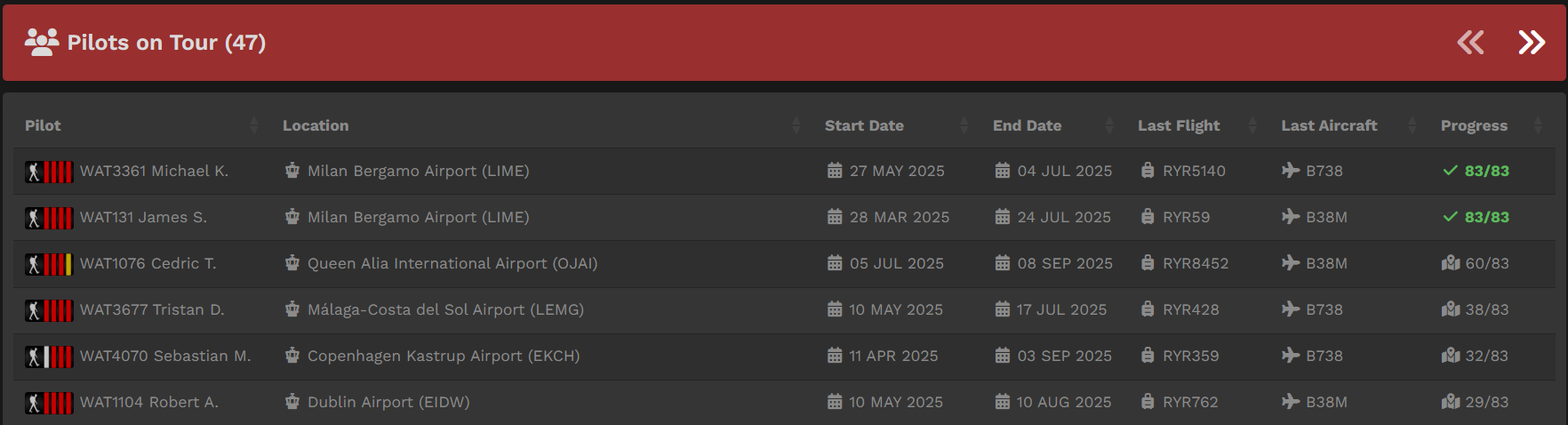
In this area, the status of *all* Pilots flying the **Tour** are noted – **Pilot Name**, **Location**, **Last Flight**, **Last Aircraft** and **Progress**. If desired, you can measure your progress against others flying the **Tour** *and* view their most recent PIREPs.

For pilots who have completed the tour, they are arranged in order of their date of completion.

[![image-1757333796087.png](https://docs.walkerair.us/uploads/images/gallery/2025-09/scaled-1680-/image-1757333796087.png)](https://docs.walkerair.us/uploads/images/gallery/2025-09/image-1757333796087.png)
---

#### **Reflying a Tour**

Referring to the **Tour Page** image above, you can see the **Japan Tour** has been completed because the *Sign Up* bar is <span style="color: #2b982b;">**Green**</span>.

[![image-1757332229631.png](https://docs.walkerair.us/uploads/images/gallery/2025-09/scaled-1680-/image-1757332229631.png)](https://docs.walkerair.us/uploads/images/gallery/2025-09/image-1757332229631.png)

A **Tour** may be re-flown at any time. In the image above, clicking the green refresh button [![image-1757334048141.png](https://docs.walkerair.us/uploads/images/gallery/2025-09/scaled-1680-/image-1757334048141.png)](https://docs.walkerair.us/uploads/images/gallery/2025-09/image-1757334048141.png) will do that. To re-fly a **Tour**, you'll need to purchase a **Tour Pass** – *and* there's a cost for doing that.

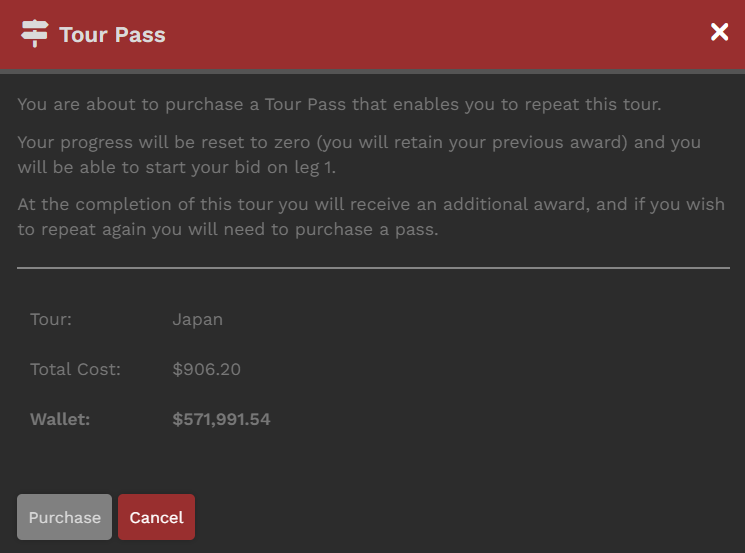
After clicking the **Green** button, the screen below will open. There, you'll see what it'll cost you to re-fly the Tour.

<p class="callout info">*Clicking the **Cancel** button at any time will cancel the transaction.*</p>

<table id="bkmrk-if-your-wallet-balan" style="border-collapse: collapse; width: 100%;"><tbody><tr><td style="width: 58.8889%;">[![image-1757334125760.png](https://docs.walkerair.us/uploads/images/gallery/2025-09/scaled-1680-/image-1757334125760.png)](https://docs.walkerair.us/uploads/images/gallery/2025-09/image-1757334125760.png)

</td><td style="width: 41.1111%; vertical-align: top;">If your Wallet Balance is *greater than* that cost, the transaction will be **approved**. You will be allowed to re-fly the Tour.

  
If your Wallet Balance is *less than* that cost, the transaction will be **disapproved**. You will **not** be allowed to re-fly the Tour

  
In our example, because the Wallet Balance is *greater than* the Total Cost, the transaction will be approved.

</td></tr></tbody></table>

---

##### **Tour Pause due to Time Compression // Cleared To Fly**

Pilots are allowed to use time compression on tour legs with our new Tour Pause system. When you use TC on a leg, the amount of time remaining after your compression is used to put you in pause mode on that *specific* tour. This means that on that one tour, you cannot start the next leg until the real-time equivalent has passed. You can, however, move on to another tour and do a leg in time compression. The goal here is to keep pilots from speed running one tour within a few hours, but also allow them to enjoy the longer tours without having to sit at a PC for 8 hours or leave it running overnight.

*Example:* you fly a 4 hour leg in 2 hours time compressed. You will be paused for 2 hours on our platform and after that 2 hours expires, you can bid the next leg. If you happen to pause the simulator for those 2 hours because you had to step away, when you land the required time is met and you'll immediately open up the next leg.

When you are not cleared to fly, you will see this icon and the clearance time (in UTC) will be presented to you in the tooltip.

[![image-1722601024822.png](https://docs.walkerair.us/uploads/images/gallery/2024-08/scaled-1680-/image-1722601024822.png)](https://docs.walkerair.us/uploads/images/gallery/2024-08/image-1722601024822.png)

Please note: you will still be deducted points for time compression per our policy and point chart here: [Rank &amp; Points](https://docs.walkerair.us/books/3-help/page/rank-points "Rank & Points")