# Pilot Profile – Title Bar

---

In the **Title Bar**, you'll find your rank insignia and name on the **left**. On the **right**, you'll find these icon buttons.

Left to right, they are as follows: **Profile** | **Logbook** | **Ledger** | **Type Ratings** | **Passport**  | **Awards**

[![image-1643200115199.png](https://docs.walkerair.us/uploads/images/gallery/2022-01/scaled-1680-/image-1643200115199.png)](https://docs.walkerair.us/uploads/images/gallery/2022-01/image-1643200115199.png)

<p class="callout info">*The icon for the page you're viewing will always be <span style="color: #ff0000;">**red**</span> to provide an additional visual reference for your **current location**.*</p>

Click them to explore the reporting generated by our *Flight Data System* from data collected and submitted to us by ACARS.

And the final icon at the end of the string?

<table border="1" id="bkmrk-icon-status-indicate" style="border-collapse: collapse; width: 40.1232%;"><tbody><tr><td class="align-center" style="width: 10.9313%; background-color: grey;"><span style="color: #ffffff;">**Icon**</span></td><td class="align-center" style="width: 14.4315%; background-color: grey;"><span style="color: #ffffff;">**Status Indicated**</span></td></tr><tr><td class="align-center" style="width: 10.9313%; vertical-align: middle;">[![image-1641417072395.png](https://docs.walkerair.us/uploads/images/gallery/2022-01/scaled-1680-/image-1641417072395.png)](https://docs.walkerair.us/uploads/images/gallery/2022-01/image-1641417072395.png)

</td><td class="align-left" style="width: 14.4315%; vertical-align: middle;">This Pilot is **Active**.

</td></tr><tr><td class="align-center" style="width: 10.9313%; vertical-align: middle;">[![image-1641417030592.png](https://docs.walkerair.us/uploads/images/gallery/2022-01/scaled-1680-/image-1641417030592.png)](https://docs.walkerair.us/uploads/images/gallery/2022-01/image-1641417030592.png)

</td><td class="align-left" style="width: 14.4315%; vertical-align: middle;">This Pilot is **On Leave**.</td></tr></tbody></table>

---

#### **Logbook Button** 

In your **Logbook**, you'll find a record of all of your flights. Each line contains high-level information about a flight you completed.

If you want to examine it in greater detail, click the **Flight Number** in the **Flight** column or the icon at the right end of the line. Each column may be sorted to simplify any analysis work you wish to do.

Clicking the *Arrow* buttons at the bottom right of the screen enables you to scroll through all of your flights.

[![image-1643200041946.png](https://docs.walkerair.us/uploads/images/gallery/2022-01/scaled-1680-/image-1643200041946.png)](https://docs.walkerair.us/uploads/images/gallery/2022-01/image-1643200041946.png)  
**SPECIAL FEATURE:** *You may also download your Logbook in .csv format by clicking the **Logbook** button.*

---

#### **Ledger Button** 

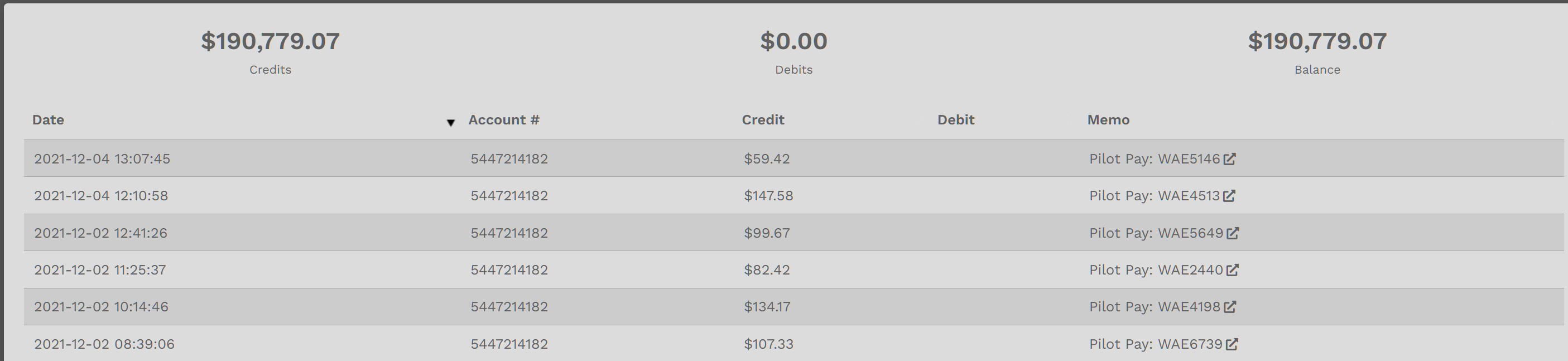
In your **Ledger**, you'll find a record of all of your personal earnings. Each line contains high-level information about a flight you completed or funds you've spent.

<table border="1" id="bkmrk-example%3A%C2%A0-in-the-pil" style="border-collapse: collapse; width: 100%;"><tbody><tr><td style="width: 100%;"> **EXAMPLE:** In the **Pilot Ledger** *below*, they've earned $190,779.07 (**Credits**). They haven't spent any of their funds – as you can see because there's $0.00 in **Debits**. The balance they have available to spend on *Jumpseats*, *Hub Transfers* or *Tour Re-Flys*, therefore, is $190,779.07.  
  
</td></tr></tbody></table>

In the **Memo Column**, you'll see the classification of the entry. If it's **Pilot Pay**, click the link behind it to view the PIREP from where the **Debit** or **Credit** amount was obtained.

<p class="callout info">*This button will only be visible in your **Pilot Profile**. You will **not** be able to view the Ledger of any other Company Pilot.*</p>

[![image-1638647157704.png](https://docs.walkerair.us/uploads/images/gallery/2021-12/scaled-1680-/image-1638647157704.png)](https://docs.walkerair.us/uploads/images/gallery/2021-12/image-1638647157704.png)

---

#### **Type Ratings Button** 

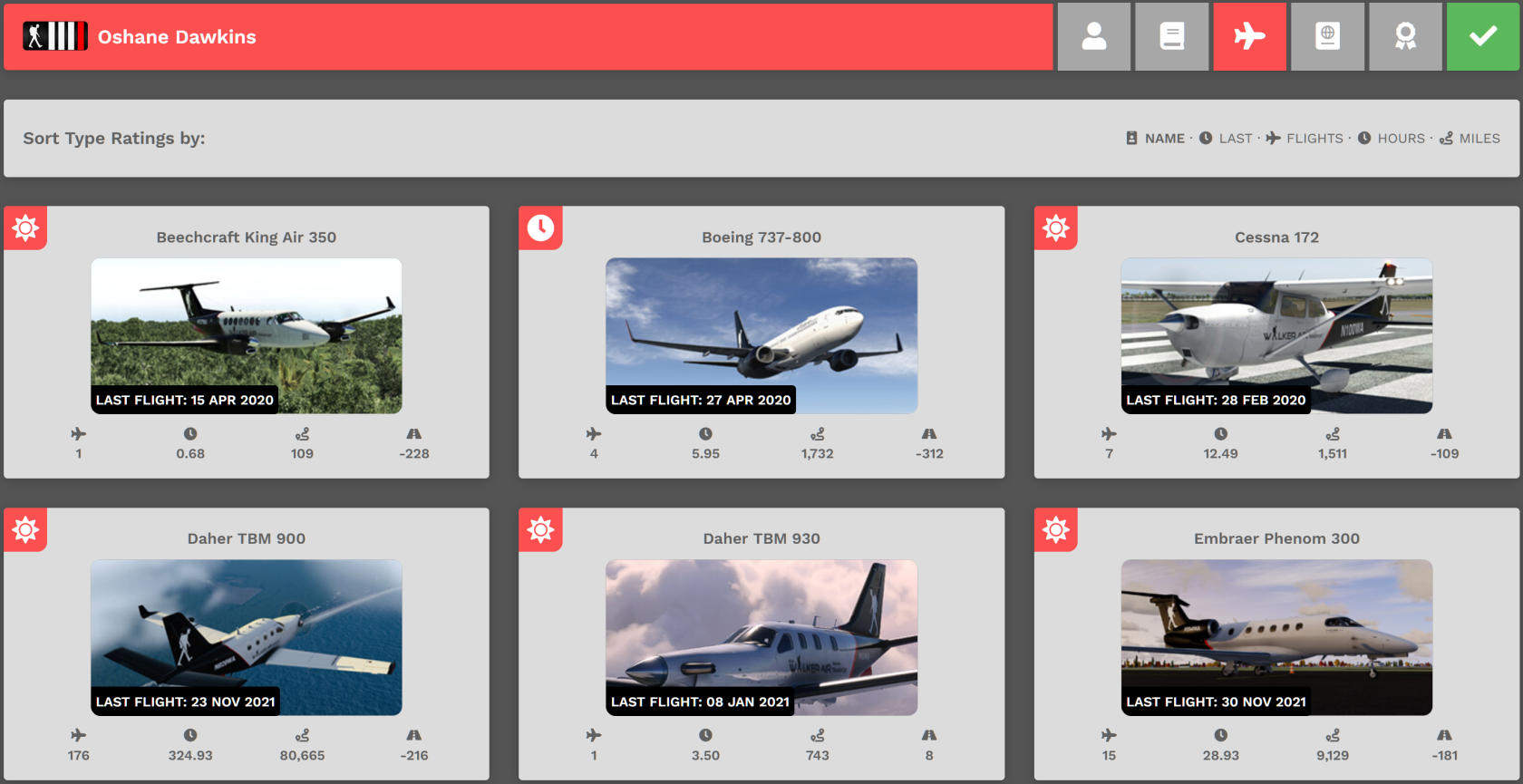
On the **Type Ratings** page, you'll find a listing of all aircraft for which you've completed a flight. Additionally, you'll also have some additional information about each one.

<p class="callout info">You can sort these entries using the name of plane, last flown, flights flown, hours flown, miles flown or simply search the name or the ICAO code of the plane you're looking for using the top bar.[![chrome_bp4POag2L8.png](https://docs.walkerair.us/uploads/images/gallery/2023-03/scaled-1680-/chrome-bp4poag2l8.png)](https://docs.walkerair.us/uploads/images/gallery/2023-03/chrome-bp4poag2l8.png)</p>

[![image-1638647916698.png](https://docs.walkerair.us/uploads/images/gallery/2021-12/scaled-1680-/image-1638647916698.png)](https://docs.walkerair.us/uploads/images/gallery/2021-12/image-1638647916698.png)

Let's use the *Embraer Phenom 300* from this Pilot's **Type Ratings** as an example.

In the upper left corner of each Aircraft profile is an icon. The icon tells you the Fleet in which the aircraft resides. They are as follows:

<table border="1" id="bkmrk-cargo-charter-schedu" style="border-collapse: collapse; width: 49.8766%; height: 120px;"><tbody><tr style="height: 29px;"><td class="align-center" style="width: 19.8765%; background-color: grey; height: 29px;"><span style="color: #ffffff;">**Cargo**</span></td><td class="align-center" style="width: 19.2592%; background-color: grey; height: 29px;"><span style="color: #ffffff;">**Charter**</span></td><td class="align-center" style="width: 20.8696%; background-color: grey; height: 29px;">**<span style="color: #ffffff;">Scheduled</span>**</td></tr><tr style="height: 86px;"><td class="align-center" style="width: 19.8765%; height: 86px; vertical-align: middle;">[![image-1638648291808.png](https://docs.walkerair.us/uploads/images/gallery/2021-12/scaled-1680-/image-1638648291808.png)](https://docs.walkerair.us/uploads/images/gallery/2021-12/image-1638648291808.png)

</td><td class="align-center" style="width: 19.2592%; height: 86px; vertical-align: middle;">[![image-1638648359552.png](https://docs.walkerair.us/uploads/images/gallery/2021-12/scaled-1680-/image-1638648359552.png)](https://docs.walkerair.us/uploads/images/gallery/2021-12/image-1638648359552.png)

</td><td class="align-center" style="width: 20.8696%; height: 86px; vertical-align: middle;">[![image-1638648320444.png](https://docs.walkerair.us/uploads/images/gallery/2021-12/scaled-1680-/image-1638648320444.png)](https://docs.walkerair.us/uploads/images/gallery/2021-12/image-1638648320444.png)

</td></tr></tbody></table>

The *Phenom 300* is an aircraft in the **Charter Fleet.** It's been flown 15 times, for a total of 28.93 hours and 9,129 miles. The average landing rate is -181fpm – and it last flew on 30 November 2021.

[![image-1638649254615.png](https://docs.walkerair.us/uploads/images/gallery/2021-12/scaled-1680-/image-1638649254615.png)](https://docs.walkerair.us/uploads/images/gallery/2021-12/image-1638649254615.png)

#### **Passport Button** 

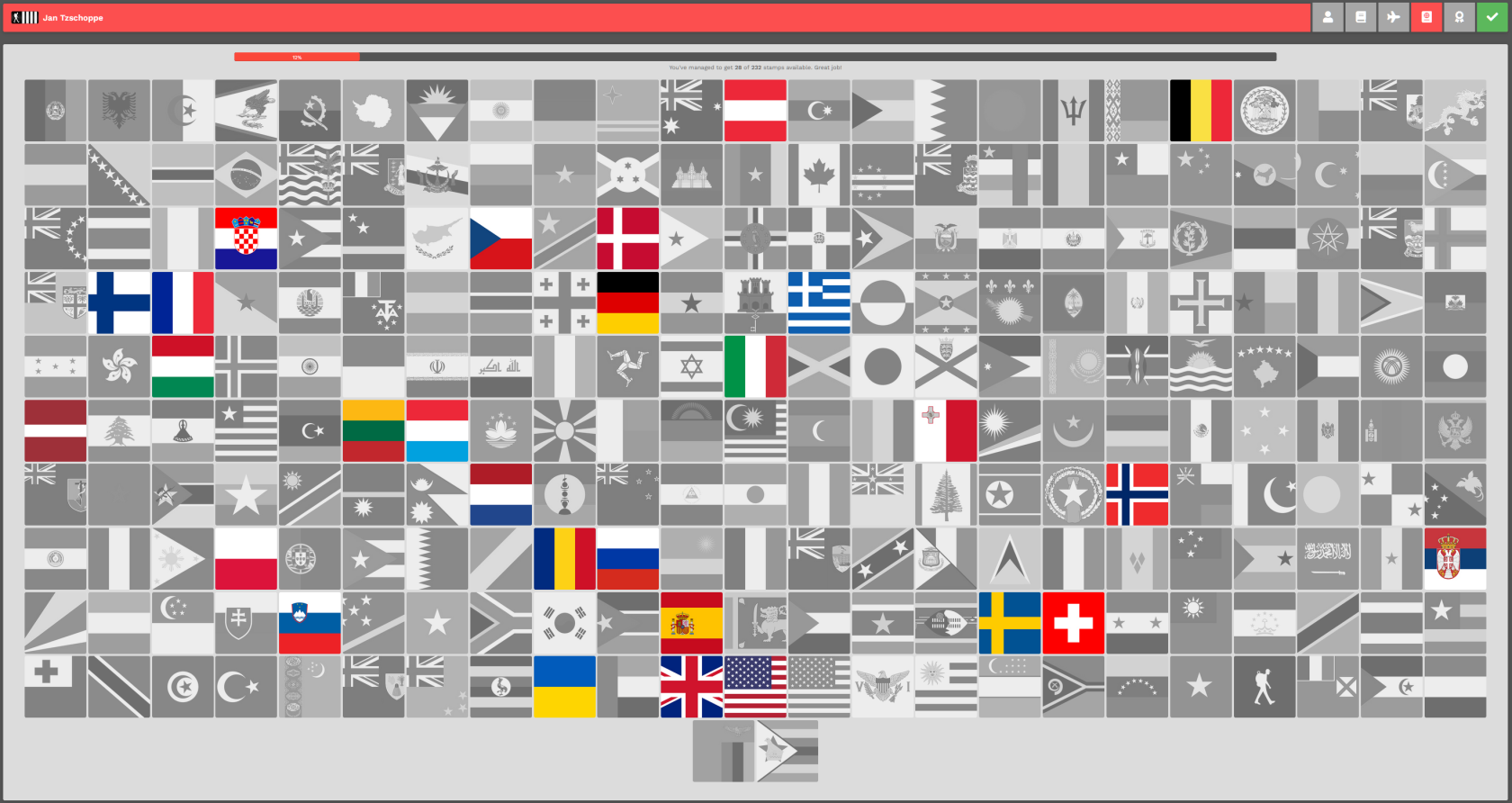
On the **Passports** page, you'll find a visual reference for where you've been in your world-wide travels.

<p class="callout warning">*In order to fully illuminate a flag in this area, you must **land** at an airport in the country the flag represents (your departure and arrival airport cannot be the same to illuminate a flag.)*</p>

[![image-1637687025092.png](https://docs.walkerair.us/uploads/images/gallery/2021-11/scaled-1680-/image-1637687025092.png)](https://docs.walkerair.us/uploads/images/gallery/2021-11/image-1637687025092.png)

Along the top, you'll see a *Progress Bar.*

[![image-1637687233166.png](https://docs.walkerair.us/uploads/images/gallery/2021-11/scaled-1680-/image-1637687233166.png)](https://docs.walkerair.us/uploads/images/gallery/2021-11/image-1637687233166.png)

---

#### **Awards Button** 

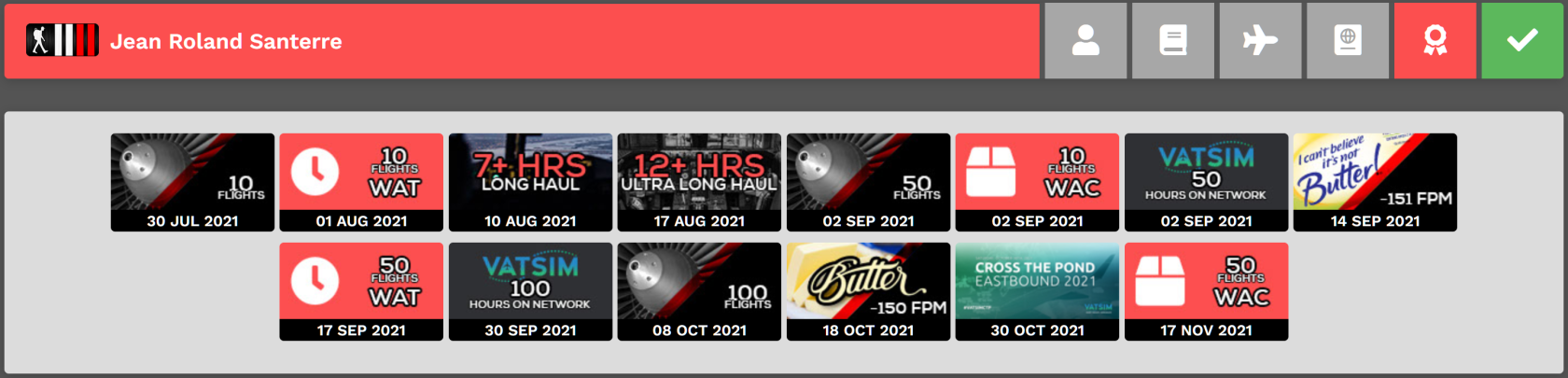
On the **Awards** page, you can see which ones you've earned.

<p class="callout info">*For more details on **Awards** – what they are and how you can earn them, click [**here**](https://docs.walkerair.us/books/3-help/page/awards).* </p>

[![image-1637687381878.png](https://docs.walkerair.us/uploads/images/gallery/2021-11/scaled-1680-/image-1637687381878.png)](https://docs.walkerair.us/uploads/images/gallery/2021-11/image-1637687381878.png)

---

#### **Pilot Status**

The final icon on the **Title Bar** visually indicates your current **Pilot Status**.

<table border="1" id="bkmrk-active-on-leave" style="border-collapse: collapse; width: 49.6296%;"><tbody><tr><td class="align-center" style="width: 12.7778%; vertical-align: middle;">[![image-1637687613436.png](https://docs.walkerair.us/uploads/images/gallery/2021-11/scaled-1680-/image-1637687613436.png)](https://docs.walkerair.us/uploads/images/gallery/2021-11/image-1637687613436.png)</td><td class="align-left" style="width: 11.6667%; vertical-align: middle;">**Active**</td><td class="align-center" style="width: 13.2716%; vertical-align: middle;">[![image-1637687575058.png](https://docs.walkerair.us/uploads/images/gallery/2021-11/scaled-1680-/image-1637687575058.png)](https://docs.walkerair.us/uploads/images/gallery/2021-11/image-1637687575058.png)</td><td class="align-left" style="width: 11.9136%; vertical-align: middle;">**On Leave**</td></tr></tbody></table>